
Introduction
What DAI Studio is, what a .dai file is, the Copy for AI loop, and who this site is for.
Docs
User documentation for the DAI Studio web application.
- Getting Started — from sign-in to your first diagram
- Accounts & Documents — sign-in, usernames, the dashboard, limits and purchases, uploads, renaming, deletion
- Your First Diagram — placing, connecting, and describing elements hands-on
- Editor Tour — the top bar, Types/Skills/Document overlays, canvas editing, panels, and shortcuts
- Copying to LLMs — Copy for AI, Copy XML, copy/paste, and the work loop with models and agents
- Choosing Element Types — picking the right type for each node
- Structuring with Nested Groups — containers, scope, and typed containers
- Sharing & Visibility — public/private documents, fork links, and raw URLs
- Keeping Your .dai File Current — the diagrams-as-living-docs discipline
For the file format itself — namespaces, metadata, element types, and every field — see the Reference.
Getting Started
From zero to your first AI-ready diagram in a few minutes: sign in, create a document, and let the guide walk you through the rest.
DAI Studio is The CAD for AI. You design an AI process, system, or domain as a diagram of semantically typed elements — context, rules, skills, tools, risks, personas, cloud services — and the diagram is a .dai file: BPMN 2.0 XML that any LLM or AI agent reads as high-quality structured context. Better context, better output.
This page covers the first five minutes. Everything here happens in your browser — nothing to install.
1. Sign in
Go to dai.studio and choose Login. There are no passwords: sign in with Microsoft, GitHub, or Google.
2. Pick a username
The first time you sign in, DAI Studio asks you to choose a username. Your username becomes part of your document URLs — dai.studio/your-name/document — and your public profile page. It must be 3–20 characters, use lowercase letters, digits, and hyphens, and cannot start or end with a hyphen. You can change it later via the avatar menu → Set Username.
3. Open the dashboard
After sign-in you land on your dashboard: Recent documents and My Files, plus a New Document card showing how many documents you have left. Every edit you make anywhere in DAI Studio is saved automatically to your account — there is no save button to remember.
New accounts can create three documents for free; more come in packs — see Accounts & Documents.
4. Create your first document
Click New Document. DAI Studio creates a new document in your account and drops you straight into the editor with a blank “Untitled Workflow”.
A five-step Getting Started guide appears over the canvas the first time you open the editor. It walks you through the core ideas in a minute or two:
- The more context you give each step — names, descriptions, rules — the better your AI outputs become.
- Click Types in the bar at the top, then drag a Group onto the canvas; groups keep related steps organised together.
- Click Types again, then drag a Rule into the group; rules set constraints the AI must follow.
- Click the rule, then open the Properties panel (
⌘\) to give it a name and description. - Save your workflow as a
.daifile and paste it into any LLM or AI agent — the richer your diagram, the more precisely the AI can execute it.
Step through the guide with ← / →, or close it with Esc. You can reopen it any time with the ✦ Getting started button on the activity bar at the right edge of the editor.
To make the group in step 2, drag a Task from the left palette and drop other elements onto it — any element becomes a container once it has children. See Your First Diagram.
5. Hand it to a model
Click Copy for AI in the top bar. It copies a link to your document’s live .dai file; paste it into any AI tool that can fetch URLs and the model reads your diagram — always the latest saved version. For tools that can’t fetch links, Document → Export → Copy XML copies the file itself.
6. Take it further
- Take the full canvas walkthrough in Your First Diagram
- Learn the whole editor surface in the Editor Tour
- Find the right types for your domain in Choosing Element Types
- See how the file format works in the Reference
- Learn the full model loop in Copying to LLMs
Accounts & Documents
How signing in, usernames, the document dashboard, limits and purchases, uploads, renaming, and deletion work in DAI Studio.
Signing in
DAI Studio has no passwords. You sign in with one of three identity providers:
- Microsoft
- GitHub
Sessions are kept in a secure cookie; when a session expires, saving stops and the status bar shows Save failed — check connection. Sign in again and reopen the document — everything up to the last successful save is intact in your account.
Your username
The username you choose at sign-up (or via Set Username later) is how DAI Studio addresses you in URLs:
- Your documents live at
dai.studio/your-name/document-name - Your public profile — the list of documents you’ve made public — lives at
dai.studio/your-name
Usernames are 3–20 characters, lowercase letters, digits, and hyphens only, cannot start or end with a hyphen, and a small set of reserved words is blocked. Availability is checked live while you type. Changing your username changes your document URLs to match.
Until you pick a username, your URLs use your numeric account ID — DAI Studio redirects those to your username URLs once you have one.
The dashboard
Signing in lands you on the dashboard:
| Section | What it shows |
|---|---|
| Recent | Your three most recently edited documents, as cards, plus New Document (with how many you have left) and Add 10 Documents for $10 |
| My Files | All documents you own, sortable A→Z or by recently modified, with delete buttons |
| Shared with me | Documents shared with you; the section appears only when there are some |
| Toolbar | The document counter (used/limit docs — click it to buy more), Upload .dai, New Document, and the avatar menu (Set Username, Log out) |
Creating documents
New Document creates a fresh “Untitled Workflow” in your account and opens it in the editor. Every edit in the editor saves automatically — there is no save button.
Creating a document counts against your account’s document limit, shown in the dashboard toolbar. New Document and Upload .dai are blocked once you reach the limit; forking someone else’s public document into your account is not, though the fork counts toward your total. The counter updates as you create and delete documents.
Limits and purchases
DAI Studio has no subscriptions — everything is a one-time purchase through Stripe checkout, and it stays on your account.
| Purchase | Price | What you get | Where to buy |
|---|---|---|---|
| Document Pack | $10 | 10 more documents on top of the 3 every account starts with | Dashboard: Add 10 Documents for $10, Get 10 docs — $10, or the document counter |
| Cloud Types | $10 | The Cloud view of the Types overlay — Generic, AWS, Azure, Google Cloud, and Cloudflare services | Editor: Types → Cloud → Unlock |
| Open Source Types | $10 | The Open Source view — hundreds of open-source projects, from Debian to PostgreSQL to Kubernetes | Editor: Types → Open Source → Unlock |
At the document limit the counter turns red with Get more →, and trying to create a document shows Document limit reached. Purchase a Document Pack to create more. After buying a type add-on you return to the same document with the new view open. Documents that already contain cloud or open-source elements open and edit normally without the add-on; it only gates adding new ones. See Cloud & Open Source Types.
Uploading a .dai file
Already have a .dai file (created with an LLM, an agent, or exported earlier)? Use Upload .dai on the dashboard to import it as a new document in your account. Uploads must be 500 KB or smaller and be a valid .dai (BPMN 2.0) file; the document takes its name from the file and starts out private. Inside the editor, Document → Export → Download .dai saves the current file as <document-name>.dai any time.
To bring part of a diagram — or a model’s output — into an existing document instead, copy the XML and paste it onto the canvas with ⌘V.
Renaming
Click the document name in the editor status bar (bottom-left), or use Document → Manage → Rename…. The name is the document ID — lowercase letters, digits, hyphens, and underscores — so renaming changes the document’s URL — dai.studio/you/new-name — and any old links, including public ones, stop working. Spread the new URL after renaming. If you pick the name of a document you already have, the dialog offers Overwrite and rename, which replaces that other document.
Deleting
Delete a document from the dashboard (delete button on the card) or the editor (Document → Manage → Delete document…). Either way you’re asked to confirm. Deletion is permanent, and every URL to that document — editor, public page, and raw file — stops working immediately.
See also
- Your First Diagram — creating content inside a document
- Keeping Your .dai File Current — housekeeping over time
- The .dai Format — what’s actually in the file
Your First Diagram
Walk through placing and connecting elements on the canvas and filling in name/fields via the properties panel.
This walkthrough builds a tiny validation workflow — a container with a rule, a context, and a generic task — and shows the editing pattern you’ll use for everything: place, connect, name, describe. Along the way you’ll touch every tool that matters.
If you haven’t already, create a new document from the dashboard with New Document first (see Getting Started).
1. Place a container
Drag a Task from the left palette onto empty canvas and make it larger with the resize handles. Any element becomes a container — a group that keeps related steps together — as soon as you drop other elements onto it.
Give it a name: double-click it (or select it and press E), type Order Validation, and press Enter.
2. Put a rule inside it
Click Types in the top bar, open AI/ML, and press on Rule. The overlay closes and the rule follows your pointer — move it over the Order Validation task and drop it when the task’s outline highlights. The task is now a container holding the rule.
Select the rule — the Properties panel opens on the right (toggle it any time with ⌘\). This is where typed elements get their content:
- Name:
Price Rule - Scope:
Global— it applies to every step in the workflow - Priority:
Critical - Enforcement:
Hard constraint— the AI must never violate it - Rule:
All line item prices must be greater than zero.
That last field is the rule’s substance. What you type in the Properties panel is what the AI reads — clear, specific text here is what makes a .dai file valuable.
3. Add context and a task
Add two more elements inside the container:
- From Types → AI/ML, drop a Context into the container, name it Order Schema, set its Source to
Manualand Content to whatever shape your data has — e.g.An order has orderId (str), customerId (str), and lines (list of {productId, quantity, unitPrice}). - Drag a Task from the left palette (the generic one — no special type) into the container, name it Validate order, and in its Description write what should happen:
Check every line item against the Order Schema and the Price Rule; route valid orders onward and reject the rest.
Alignment guides appear while you drag, so lining elements up takes no effort. If something ends up outside the container’s border, the container doesn’t grow to fit it — drag the element back in, or resize the container.
4. Connect the flow
Select the Order Schema context. In the small action menu beside it, drag out of Link to another element and release over Validate order to create a connection. (Or press C for the Global connect tool and drag from one element to the next.) Local context shapes the step it feeds, so this connection tells the AI that Validate order uses the schema.
The action menu can also add the next step for you: Add task or Add end event creates a new element already connected to the selected one. When a flow leaves a gateway, select the connection and give it a Name — yes / no — which is what the AI reads as the branch condition.
5. Watch the status bar
The status bar at the bottom shows the document name and the save state. Every edit auto-saves within a couple of seconds of your last change — Saving… flips back to Saved on its own.
6. Hand it to a model
Click Copy for AI in the top bar and paste the link into any AI tool that can fetch URLs — it reads your live diagram. For a chat that can’t fetch links, use Document → Export → Copy XML and paste the file itself. See Copying to LLMs.
What you just learned
- Place — drag from the Types overlay or the left palette; drop elements onto any task to make it a container
- Connect — use the action menu’s link button or the Global connect tool; name gateway branches to declare conditions
- Describe — select an element to open the Properties panel; its fields are the element’s typed values
- Save — automatic, always; the status bar tells you where things stand
- Share — Copy for AI hands the live diagram to a model
Ready to go wider? See the Editor Tour for every panel and shortcut, Choosing Element Types for the type vocabulary, and the Reference for exactly what each element means in the file.
Editor Tour
Every toolbar, overlay, panel, and shortcut in the DAI Studio editor — where everything lives and what it does.
The editor is a single browser page: top bar above, tool palette on the left, canvas in the middle with a zoom navigator in its corner, panels on the right, status bar at the bottom. Everything saves automatically as you work.
Top bar
| Control | What it does |
|---|---|
| DAI logo | Back to your dashboard |
| Types | Opens the Types overlay — every element type you can place. See Types overlay |
| Skills | Opens the Skills overlay — a catalog of published agent skills. See Skills overlay |
| Document | Opens the Document overlay — DAI Builder prompts, export, privacy, rename, and delete. See Document overlay |
| Copy for AI | Copies a link to this document’s live raw XML — paste it into any AI tool that can fetch URLs. See Copying to LLMs |
| Lock / globe icon | Shows whether the document is private or public; click it to open the Document overlay’s privacy settings |
| Avatar | Account menu: Set Username and Log out |
Overlays open over the canvas. Close one with its ✕, by clicking its button again, or with Esc.
Visitors opening someone else’s public document get a Read only badge and a ⊕ Fork Me Now button that copies the document into their own account. They can still use Copy for AI and the Document overlay’s Export section; Types and Skills are disabled. See Sharing & Visibility.
Types overlay
Every element type you can place, organised as views → categories → groups:
- Domains — the free core vocabulary: Workflow (BPMN), AI/ML, Business, Product, Software
- Cloud — Generic, AWS, Azure, Google Cloud, and Cloudflare services (one-time unlock)
- Open Source — hundreds of open-source projects across 17 categories (one-time unlock)
- Other — anything else, such as your own types
Type in Search types… to filter across every view; ↑ / ↓ step through categories. Hover a tile to read its description. Press a tile and the overlay closes, leaving the new element under your pointer — click or release to drop it on the canvas or into a container.
Locked views show 🔒 and an Unlock button; see Accounts & Documents. Types are explained in Choosing Element Types and the Element Types reference.
Skills overlay
A searchable catalog of published agent skills, sorted by popularity, with publishers listed down the left side. Drag a skill onto the canvas to create an AI/ML Skill element pre-filled with its name, ID, source, page link, and install command. The ↗ link opens the skill’s page.
Document overlay
| Section | What’s in it |
|---|---|
| DAI Builder | Ready-made prompts for working with a model: Diagram a document, Diagram a PDF, Diagram this codebase, Update existing .dai, Execute workflow, Explain this workflow, Improve this workflow. Click one to expand it, then copy. See Copying to LLMs |
| Export | Copy URL (the raw-file link), Copy XML (the full .dai file to the clipboard), Download .dai |
| Privacy | Private / Public, the public link when public, and Rotate raw URL. See Sharing & Visibility |
| Manage | Rename… and Delete document…. See Accounts & Documents |
Visitors see only the Export section.
Left palette
| Tool | Key | What it does |
|---|---|---|
| Hand | H | Drag to pan the canvas |
| Lasso | L | Drag to select everything inside an area |
| Space | S | Drag to insert or remove space; shapes beyond the line move, and containers that straddle it resize |
| Global connect | C | Drag from one element to another to connect them |
Click a tool again (or press Esc) to turn it off. Below the tools are three shapes you can drag straight onto the canvas: Start, End, and Task. Everything else comes from the Types overlay.
Canvas
Selecting. Click to select; Shift-click to add or remove an element. Shift-drag on empty canvas, or the Lasso tool, selects an area. ⌘A selects everything; Esc clears the selection.
Moving around. Drag on empty canvas to pan (the middle mouse button works too). Scroll to move the view; ⌘-scroll or pinch to zoom around the pointer. ⌘ + arrow keys pan the view, in larger steps with Shift.
Moving and resizing. Drag to move; arrow keys nudge the selection by 1px, or 10px with Shift. A selected shape has eight resize handles. Alignment guides appear and shapes snap to their neighbours’ edges and centres while you move or resize — hold ⌘ to move or resize freely.
Labels. Double-click an element, or press E, to edit its name in place. Enter saves, Shift+Enter adds a line break, Esc cancels.
The action menu. A selected element shows a small menu beside it:
- Add end event, Add task, Add note — click to add a connected element, or drag one out to place it
- Link to another element — click it, or drag out of it, to draw a connection
- Change type (T) — opens the type picker
- Clean up layout — on containers: lines children up on an even grid and fits the container around them
- Delete
With several elements selected the menu offers Change type of N elements and Delete N elements.
Connections. Select a connection to edit it: drag an end handle onto another element to reconnect it, drag bend points, or slide a segment. Handles snap to the centres of element sides; hold ⌘ to place them freely. Connections have no action menu — press Delete to remove one.
Containers. Drop elements onto a Task — or any typed element — and it becomes a container; remove its last child and it becomes a plain element again. A container keeps its size: content that extends past its border is clipped rather than growing the container. See Structuring with Nested Groups.
Copy and paste. ⌘C copies the selection to the clipboard as a self-contained .dai fragment. ⌘V pastes .dai XML from anywhere — another document, another browser tab, or a model’s output — and the pasted elements follow your pointer until you click to place them.
The type picker. Press T, or click ⇋ in the action menu or the Properties panel header, to change the type of the selected element — or of every selected element at once. Type to search, ← / → to step through categories, ↑ / ↓ and Enter to choose. Values the new type shares are kept; values it doesn’t have are cleared.
Zoom navigator
The card in the bottom-left corner of the canvas shows a map of the whole diagram. Drag the highlighted box to pan, click anywhere on the map to jump there, and use the slider to zoom from 20% to 400%.
Right panels
The activity bar on the right edge toggles five panels:
| Panel | What it does |
|---|---|
Properties (⌘\) | The form for the selected element — its name and every field of its type. With nothing selected it shows the diagram’s name, version, and description; with several elements selected it lists them. The header holds the type picker (⇋), Clean up layout on containers, and ⇤ expand, which widens the panel to half the screen with larger text for long-form writing |
| Library | Your diagram’s type dictionary — every type in use with its description, which you can edit. Descriptions are stored in the file and travel with it, so this is where you say what story means in this diagram |
| Outline | The diagram as a tree — containers as folders, everything else as labelled leaves. Click a row to select that element on canvas |
| Help | Explains the selected element’s type and every one of its fields |
| Getting started (✦) | Reopens the five-step Getting Started guide |
If a document uses a type this editor doesn’t have, the element is drawn grey with a dashed outline and the Properties panel shows its values read-only. They are saved unchanged.
Status bar
The document name at bottom-left is also a rename button — clicking it opens the rename dialog (renaming changes the document URL; see Accounts & Documents). Next to it, the save indicator cycles through Saved, Saving…, Unsaved, and Save failed — check connection.
Model pickers
Fields that name an AI model — the Model field on an Agent, a Prompt, or an AI/ML Model element — are dropdowns fed from the live model list at dai.studio/api/models, grouped by provider. The choice is recorded in the file and read by whatever model executes it.
Keyboard shortcuts
| Shortcut | Action |
|---|---|
⌘Z / ⇧⌘Z | Undo / redo |
⌘= / ⌘- | Zoom in / out |
⌘0 | Fit diagram to viewport |
⌘\ | Toggle the Properties panel |
⌘A | Select all |
⌘C / ⌘V | Copy selection as .dai / paste .dai XML |
Delete / Backspace | Delete the selection |
| Arrow keys | Nudge selection 1px (Shift: 10px) |
⌘ + arrow keys | Pan the view (Shift: larger steps) |
E | Edit the selected element’s label |
T | Change type of the selection |
H / L / S / C | Hand, Lasso, Space, Global connect tool |
Esc | Cancel the current action, close an overlay, or clear the selection |
Hold ⌘ | Turn off snapping while moving, resizing, or editing connections |
On Windows and Linux, use Ctrl in place of ⌘.
Read a page from the Reference to see what every element and attribute in the file means.
Copying to LLMs
Copy for AI hands a model a link to your live .dai file; Copy XML puts the whole file on your clipboard; ⌘V brings a model’s XML back onto the canvas.
A .dai diagram is high-quality context for whatever model you’re about to talk to: the element tree, its names, descriptions, rules, scopes, and the diagram’s type framing arrive in one structured file. That’s the core loop of DAI Studio — the LLM reads a precise description of your intent instead of you re-typing it into a chat window.
The loop
- Design context in DAI Studio — place, connect, and describe elements until the diagram says what you mean (see Your First Diagram).
- Copy for AI — click the button in the editor’s top bar. It copies a link to the document’s raw
.daifile; paste it into any chat, agent, or tool that can fetch URLs. - Or Copy XML — for tools that can’t fetch links, open Document → Export → Copy XML. The complete
.daifile — every element, value, and description — is on your clipboard as plain text. - Run — execute the workflow, generate the code, answer against the context, whatever the diagram drives.
- Iterate — models that suggest structural changes can say them in
.daiterms. Copy the XML they produce and press⌘Von the canvas to drop it into your diagram; upload it with Upload .dai to keep both versions side by side; or apply the changes by hand in the editor, where everything keeps auto-saving.
Copying part of a diagram
Select some elements and press ⌘C: the selection is copied as a self-contained .dai fragment — the elements, their values, and the connections between them. Paste it into a chat to ask about just that slice, or into another document with ⌘V.
DAI Builder prompts
If drafting a workflow from scratch feels heavy, Document → DAI Builder has ready-made prompts for outsourcing the work to a model:
| Group | Prompts |
|---|---|
| Diagram | Diagram a document, Diagram a PDF, Diagram this codebase |
| Refine | Update existing .dai, Execute workflow, Explain this workflow, Improve this workflow |
Click a prompt to expand it, then copy it into your model along with your document, PDF, codebase, or .dai file. Every prompt tells the model to read the format spec at https://dai.studio/llms.txt first.
Sharing instead of pasting
For tools that can fetch URLs — increasingly most of them — a link beats a paste:
| Who’s copying | Link Copy for AI gives | Notes |
|---|---|---|
| You, the owner | https://dai.studio/you/doc/raw/<token> | Tokenised, so it keeps working if the document is private. Document → Privacy → Rotate raw URL replaces the token and invalidates the old link for private access |
| A visitor to a public document | https://dai.studio/you/doc/raw | No token needed while the document is public |
Raw URLs return the live file as plain text with permissive CORS, so an agent can re-fetch the current version whenever it needs to — the plan evolves in your editor and never goes stale in the agent’s context. Document → Export → Copy URL copies the same link. Full details, including what visibility means for who can see what, are in Sharing & Visibility.
What the model reads
Everything you wrote and nothing you didn’t: the workflow metadata that frames the whole diagram, the type dictionary with your per-diagram descriptions, each element with its type and values, and — since the file is valid BPMN 2.0 — structure any model already understands from its training data. The Reference documents the vocabulary end to end.
That’s the whole discipline: say it once, precisely, in the diagram — then let every model you work with read the same truth.
Choosing Element Types
A step-by-step heuristic for selecting from the element types, organized by domain - what to reach for and when.
Element types are a vocabulary, not a prescription. There are more than seventy of them across four domains — AI/ML, Business, Product, and Software — plus the Workflow (BPMN) control-flow types and hundreds more for cloud and open-source infrastructure, and every one carries a name, a description, and typed fields. A diagram that names its concepts precisely gives the AI more to work with, so the craft is choosing the right type per node and filling it honestly.
The categories at a glance
The Domains view of the Types overlay holds the free core vocabulary:
- AI/ML — how the AI thinks and acts: Agent, Context, Dataset, Evaluation, Guardrail, Human, Knowledge, Markdown, MCP Server, Memory, Model, Output, Prompt, Router, Rule, Session, Skill, Tool
- Business — strategy and governance: Assumption, Budget, Competitor, Constraint, Customer, Decision, Dependency, Initiative, Key Result, KPI, Milestone, Objective, Partner, Policy, Question, Requirement, Risk, Stakeholder
- Product — users, discovery, and delivery: Criteria, Epic, Experiment, Feature, Feedback, Hypothesis, Insight, Journey, Metric, Outcome, Persona, Problem, Release, Roadmap, Story, To-do
- Software — technical architecture: Client, Component, Config, Database, Decision, Dependency, Endpoint, Environment, Event, Feature Flag, Interface, Issue, Job, Model, Pipeline, Queue, Repository, Service, System, Test
- Workflow (BPMN) — process plumbing: start events, end events, gateways, tasks, annotations, and data stores — see Flow & Structure Elements
Two further views cover infrastructure: Cloud (Generic, AWS, Azure, Google Cloud, Cloudflare) and Open Source (hundreds of self-hostable projects). They’re one-time add-ons — see Cloud & Open Source Types.
Each category page in the Reference documents every type’s fields and exact meaning.
A process for choosing
- Ask what the node is, not what it does. A node that states a constraint is a Rule. A node that names a capability with concrete implementation is a Tool. A node that gives the AI background knowledge is a Context. Match the concept first, then fill in that type’s attributes.
- If two types fit, pick the more specific one — and read the descriptions. Many types come in deliberate pairs: a KPI tracks an initiative while a Key Result measures one Objective; a Hypothesis is tested while an Assumption is taken as true; Feedback is the raw input while an Insight is the conclusion; an Event is the message contract while a Queue is the channel; a Business Decision differs from a Software Decision (an ADR); a Software Model is a data schema while an AI/ML Model is an LLM. Hover a tile in the Types overlay to read its description. When you care about the distinction downstream, so does your AI. When you genuinely don’t, the generic Task (untyped) is always honest — its name and description still say what it means.
- Borrow from every category in the same diagram. The categories don’t have to agree; a real slice of work usually spans them. The CSV-export example combines a Persona, Story, Requirement, Endpoint, Test, and Issue — three categories, one coherent feature. Don’t build “an AI diagram” or “a product diagram”; build this problem’s diagram.
- Change your mind cheaply. Select one or more elements and press
T(or click ⇋ in the action menu or the Properties panel header) to switch type when a better fit appears. The name, description, and any fields the new type shares come along; fields it doesn’t have are cleared, and one undo restores everything. Type choice is a refactoring, not a commitment.
Say what the type means — in your diagram
Because types are a vocabulary, each has an intentionally general description in the type catalog — a story might mean a user story here and a blog post there. The Library panel lists every type in use in your diagram with its description; edit those descriptions, and they’re written into the file’s type dictionary, which travels with every save, Copy XML, and raw link — the AI reading the file sees what each type means in this context.
Heuristics worth internalizing
- Name with nouns, describe with intent. “Price Rule”, not “This rule is about price”; one-liners in the name, nuance in the description (
dai:notes). - Scope what should be scoped. Global rules and context apply to everything; local ones only flow downstream through connections — placement is meaningful.
- Connect before you over-describe. A connected pair with modest text often beats four lonely nodes with paragraphs, because connections establish what relates to what (see Structuring with Nested Groups).
- When in doubt, describe it the way you’d brief a new teammate. If a node needs a paragraph to explain, that paragraph belongs in its description, not left implicit — the Properties panel’s ⇤ expand mode gives you room to write it.
The full type catalogue, with every field and example, is the Element Types reference.
Structuring with Nested Groups
How to use containers to organize diagrams into sub-state machines: systems within systems, agents within agents.
Containers are bpmn:subProcess elements that hold other elements. They are the core structural tool in a .dai diagram because nesting is how a diagram says this contains that: a system contains services, an agent contains its tools and rules, a release contains its features. Containers nest freely at any depth, so a diagram can be a tree of arbitrary shape.
Making a container
There is no separate “group” to place. Any element becomes a container when you drop other elements onto it:
- Drop elements onto a plain Task and it becomes an untyped group — pure structure.
- Drop elements onto a typed element — an Agent, a System, an Epic, a VPC — and it becomes a typed container whose type says what the region means.
- Drag the last child out and it turns back into an ordinary element. Its type and values never change either way.
Markdown notes are the one exception: they never take children.
Some types are placed as containers from the start because that’s how they’re almost always used: Agent, MCP Server, Session, Initiative, Release, Roadmap, Environment, System, and most cloud account, region, and network types.
Why nesting beats sprawling
A flat diagram forces every element into one visual and semantic plane. Nesting lets each region of the diagram carry its own meaning:
- A Rule inside a container governs that container. Scope rules and context by placement rather than by restating their reach in prose.
- A container is a named abstraction. “Payments” as a container of six elements keeps the top-level diagram legible; readers — humans and models — can stop at the boundary until they need to go in.
- Connections can cross container boundaries, so containment and flow are orthogonal: sub-state machines inside a sub-state machine, with connections between them, is the native shape of a real system.
Typed containers
A typed container is a statement about everything inside it:
| Container | Typically contains |
|---|---|
| Agent | The tools, skills, rules, and prompts that define one autonomous AI — and other agents, for multi-agent systems |
| MCP Server | The tools it exposes |
| System | The services, clients, databases, queues, and jobs built and released together |
| Environment | What is deployed in one environment |
| Initiative | Its milestones, budget, requirements, and risks |
| Release / Roadmap | The features and stories that ship / the epics sequenced over a planning horizon |
| Cloud account → region → network → subnet | The infrastructure running inside each boundary — see Cloud & Open Source Types |
Agents nested inside agents — a Pipeline Agent containing a Researcher and a Writer, connected by a sequence flow — is how .dai expresses sub-agent architectures. The multi-agent research pipeline example shows the full shape.
Working with containers
- A container keeps its size. Content that extends past its border is clipped, not used to grow the container. Resize it with its handles, or use the Space tool (
S) to open up room — containers that straddle the line grow with it. - Tidy with Clean up layout. Select a container and choose Clean up layout from its action menu or the Properties panel header: its children are lined up on an even grid and the container is resized to fit them.
- Move things in and out by dragging. Drop an element on a container to put it inside; drag it out onto the canvas to take it out.
- Use the Outline panel to navigate deep trees. Folders in the Outline mirror your nesting and can be collapsed; click a row to jump to any element without scrolling (see the Editor Tour).
Practical patterns
- One container per coherent thing. The “System” and “Content” containers in an app build — each with its own rules, tests, and dependencies — read cleaner than one giant diagram.
- Name containers like the subsystem they are. “Checkout”, “Grounding”, “v2 scope”: the name is what appears in the Outline tree and what the AI reads as the region’s intent.
- Prefer a typed container when one fits. A System or an Agent tells the AI more than an untyped group with the same name.
- Add a description. A container’s description (
dai:notes) frames everything inside it — one sentence about what this region is for.
The XML form, container attributes, and how typed containers serialize are documented in Flow & Structure Elements.
Sharing & Visibility
Every document is private by default - you decide when to flip it to public, where the raw file for either lives, and what forking means.
Private and public
Every document in DAI Studio is one of two visibilities, set in the editor’s Document overlay under Privacy. The lock or globe icon in the top bar shows the current setting and opens it:
| Private | Public | |
|---|---|---|
| Who can view | Only you | Anyone with the link — no sign-in needed |
| Editor page | The full editor, yours alone | A read-only version with a Read only badge |
| Indexing | Not indexed — kept out of search engines | Indexable; appears on your public profile |
| Forking | Not forkable | Visitors can click Fork Me Now to copy it into their account |
The change applies immediately — click the lock or globe (or Document), choose Private (“Only you can view”) or Public (“Anyone with the link can view”), and when public the Privacy section shows the public link to copy.
Your public profile
Your username has a public page — dai.studio/your-name — listing every document you’ve made public. It’s the natural home for showcases, examples, and work-in-progress you want feedback on. Private documents never appear there. (See Accounts & Documents for username rules.)
The raw file — public documents
Every document has a raw URL that returns the live .dai XML as plain text. For a public document it needs nothing but the URL:
https://dai.studio/your-name/document/raw
This is the link to paste into an LLM or wire into an agent — the endpoint allows cross-origin fetches, so tools and models can retrieve the current file themselves instead of aging in a chat buffer. Because it follows the document, it is always the latest saved version.
The raw file — private documents
Private documents also have a raw URL, but it carries a secret token:
https://dai.studio/your-name/document/raw/<token>
Whoever has the full link can fetch the file — the token is the credential, no session needed. You control it from the editor:
- Copy for AI in the top bar, or Document → Export → Copy URL, copies the tokenised raw link (generating the token on first use). As the owner you always get the tokenised link, even for a public document — so links you hand out keep working if you later make the document private.
- Document → Privacy → Rotate raw URL invalidates the previous token immediately and copies a fresh link to your clipboard (the button confirms with Copied new URL!). Use it when a review round ends or a link leaks.
While a document is public, every raw link works, with or without a token; rotating matters once it is private. Rotating affects only the raw link — the editor page for a private document was always yours alone.
Forking
A visitor lands on your public document, likes it, and clicks Fork Me Now: DAI Studio copies the entire file into their account as a new document. The fork:
- is theirs — they edit it independently, and your original never changes;
- starts private in their account, with a fresh URL, and counts toward their document total;
- works for anyone viewing a public document — visitors who aren’t signed in are asked to sign in first, and the fork then completes automatically.
Forking is also the easiest way to build on the community examples — open one, fork it, bend it to your domain.
Choosing how to share
| You want | Do this |
|---|---|
| Feedback or showcase | Make the document Public; share the page URL or your profile |
| A specific person or agent to read a draft | Keep it Private; share the tokenised raw URL from Copy for AI |
| A model to always read the latest version | Share the raw URL (public /raw, or private with token) instead of pasting |
| A starting point others can remix | Make it Public and let them Fork Me Now |
| Review round over, link compromised | Rotate raw URL — old links die instantly |
Two things break every link to a document at once: renaming (the document name is the last URL segment — see Accounts & Documents) and deleting. If a shared document outlives its name, send the new URL.
Keeping Your .dai File Current
A diagram is a living document - it stays useful only if it keeps matching reality.
The point of a .dai diagram is precision: every element says exactly one true thing about your project. That makes it a living document — a model of the plan — stale after every change you don’t apply back to it. Keeping it current is a discipline, not a rewrite.
When something changes, change the diagram
The common triggers and their one-step responses:
| What happened | What you do |
|---|---|
| Strategy or plan changes | Update the Objective, re-scope Rules, retire what no longer applies |
| A requirement is clarified | Edit the Requirement; adjust related stories and tests |
| A decision gets made | Add a Decision (Business, or Software for an ADR) with context → decision → consequences; update what it affects |
| A risk materializes or dies | Move the Risk’s status or delete it; drop mitigated ones |
| A bug ships | Add an Issue; resolve/remove it when it’s fixed |
| An open question comes up | Add a Question; record the answer and act on it, then delete it |
| An assumption is confirmed or broken | Update the Assumption’s status; if it broke, act on ifWrong and delete the parts of the plan that relied on it |
| A milestone lands | Mark it achieved; clear out the interim flags that mattered only until now |
Notice the pattern: add, edit, delete — rarely archive. Because the AI reads the whole file as ground truth, a stale node actively lies about the present. Deleting is often the right instinct; if history matters, one Markdown note summarizing what changed and why beats a graveyard of superseded elements.
Housekeeping that keeps you honest
- Rename to match usage. As a document’s purpose sharpens, rename it (status-bar click, or Document → Manage → Rename…) so the URL says what it actually is. Remember that renaming changes the URL — spread the new link if the document is shared (see Sharing & Visibility).
- Download before a big restructure. Planning to cut a region loose and rewire? Document → Export → Download .dai first for a one-click snapshot you can re-upload or diff later.
- Split when a diagram stops being about one thing. The moment a file contains two projects, cut the second into its own document — select it,
⌘C, create a new document,⌘V, then delete it from the original. A too-large diagram dilutes context instead of concentrating it. - Refresh the type dictionary when meaning shifts. The type descriptions in the workflow metadata (managed via the Library panel) auto-populate once and then are yours — re-describe what a type means now, in this project.
Let the AI help maintain it
The same copy loop that executes your diagrams can renew them. Paste the current file with a prompt like “read this .dai file, suggest improvements to its structure, completeness, and clarity, then produce an updated version” — the Improve this workflow prompt in Document → DAI Builder is exactly this — then apply what you accept by hand, paste the model’s XML onto the canvas with ⌘V, or upload the result as a new document to compare against the original. A periodic pass of “explain this workflow back to me” (Explain this workflow in the DAI Builder) is the cheapest staleness detector there is: wherever the explanation surprises you, the diagram is either stale or lying.
In short
- Keep diagrams small and true rather than big and exhaustive
- Delete stale elements; notes — not graveyards — for history
- Rename promptly, snapshot before surgery, split when ideas diverge
- Run the improve/explain loop on a cadence that matches how fast the project moves
The reward: every LLM you work with, every teammate you share the link with, reads the same current truth. Accounts & Documents covers the file management mechanics; Sharing & Visibility covers the links.
Blog
- How DAI Started
- Generating an Authentication App with DAI Studio
- DAI File Generation
- Report Generation with DAI Studio
- Cloud Types
How DAI Started
Date: March 28, 2026
I have spent six years using BPMN as my primary diagramming toolset, creating hundreds of .bpmn files to describe engineering architectures and workflows.
When I decided to test how well LLMs could interpret an uploaded diagram, the accuracy of their understanding genuinely surprised me. The structured format conveyed meaning far better than I expected. While plain .bpmn proved capable, extending the standard yielded even stronger results.
This website was built from a single website.dai file processed through OpenCode. I have not manually edited a single file outside of that .dai file, and the result is exactly what I wanted — nothing more.
When you give LLMs precise, well-structured input, they produce remarkable output. I believe the quality of context matters as much as, if not more than, the model itself.
Cheers,
Ted :)
Generating an Authentication App with DAI Studio
Date: April 6, 2026
I built an authentication app — dai-studio/ex_auth — using DAI Studio and a single .dai file.
The .dai file describes an environment, a system, and CI/CD. That was the entire input. The total build cost $0.81, and what is checked in is the exact repo — nothing more, nothing less.
This is what DAI Studio is for. You structure your intent precisely, feed it to a model, and get back exactly what you asked for. The discipline is in the context, not the prompting.
Enjoy,
Ted :)
DAI File Generation
Date: July 12, 2026
What if you could generate .dai files from any information source?
The dai.studio/llms.txt file contains the complete file specification and can be used to generate or edit .dai files. Here are some prompts to get started.
DAI from a document
Using https://dai.studio/llms.txt, build a .dai file from this document.
DAI from a codebase
Using https://dai.studio/llms.txt, build a .dai file from this codebase.
Here is an example .dai file generated from SuperNova arxiv.org/html/2604.08477v1.
With a simple prompt, anything becomes a DAI file.
Enjoy,
Ted :)
Report Generation with DAI Studio
Date: September 7, 2026
The point of this one isn’t the model — it’s the context. I built a single workflow diagram once, then ran it through five different models to see what “same input, different model” actually costs and produces.
The diagram — SP500 PE Monthly — is three tasks: SP500 PE monthly (fetch the data) → Chart the Data → Build Report, with a red Rule: HTML annotation pinning the output format. That’s it. No hand-written spec, no back-and-forth.
The entire human input was two prompts against the diagram’s raw XML:
Plan mode:
plan out building https://dai.studio/blog/sp500-pe-report/raw
Code mode:
build
Five models, five reports, five prices:
| Model | Cost | Report |
|---|---|---|
| Claude Opus 5 | $2.65 | View Report — compact hand-built SVG chart plus a full stats table (percentiles, mean, max/min with dates, current percentile rank) |
| GPT-5.6 Sol | $1.90 | View Report — the most editorial output: headline treatment, a written interpretation paragraph, and an explicit methodology note (R-7 interpolation) |
| GLM 5.3 | $0.86 | View Report — concise, with a real analytical findings paragraph (decade-by-decade averages, the dot-com era’s 80-month streak above the high band) and a correct citation back to the source workflow |
| Kimi K3 | $0.42 | View Report — correct numbers, but the chart is brute-forced: every gridline and data point hardcoded inline, ballooning the file to over 1,300 lines for the same chart the others drew in a fifth of the code |
| Claude Sonnet 5 | $0.31 | View Report — the smallest correct output, clean custom SVG, same numbers as the expensive runs |
All five models agree on the numbers that matter: 1,281 monthly observations from January 1920 to September 2026, an 80th-percentile PE of 22.12, a median of 16.52, a 20th percentile of 10.42, and a current reading around 26.36 — roughly the 90th percentile of the entire series.
Cost didn’t track quality here so much as verbosity. Claude Sonnet 5 at $0.31 matched the expensive runs on substance while using a fraction of their tokens; Kimi K3 spent effort hardcoding SVG coordinates for a chart the others drew far more efficiently. Same diagram, same two prompts, five different ways of getting to the same correct answer.
Cheers,
Ted :)
Report Generation with DAI Studio Part 2
Date: September 10, 2026
Let’s try this again, but with a more complex workflow. The previous post Report Generation with DAI Studio Part 1 provided basic input: fetch the data, build the report. This time, let’s add lots more context about the report’s content and structure, and see how the models handle it.
The diagram — SP500 PE Monthly v2 — keeps Part 1’s three tasks (SP500 PE monthly → Chart the Data → Build Report), but wraps them in a lot more scaffolding this time:
- An Environment subprocess sitting alongside the flow: a
D3JSdependency, anHTMLrule markedcritical/hardenforcement, aStylecomponent note (Inter font, alternating dark/light-blue sections — dark chart, light overview, dark stats, light data), anAccessibilitytest stub, and aClarityobjective — “Make the report clear. Readability must be excellent.” - The Report task is no longer one box. It’s a subprocess with four explicit children: Display Chart Here, Key stats here (four square tiles: current PE, high/80th percentile, low/20th percentile, median), Data and Citations, and Overview (“a short overview of the Chart, its history, and the current valuations”).
Same two human prompts as before, this time against the new diagram:
Plan mode:
plan out building https://dai.studio/blog/sp500-pe-report-2/raw
Code mode:
build
Three models got the same diagram and the same two prompts this time:
| Model | Cost | Report |
|---|---|---|
| Claude Sonnet 5 | $1.21 | View Report — inlined the full 1,281-month dataset (January 1920–present) directly in the page, matched Part 1’s numbers exactly (26.09 current, 22.12 high/80th, 10.42 low/20th, 16.52 median), kept a decade-by-decade table, and gave the chart a proper role="img" plus a full descriptive aria-label |
| Claude Haiku 4.5 | $1.45 | View Report — split the data out into a separate data.json fetched at runtime; that file silently starts in August 1934, dropping the first 174 months of the series it’s supposed to cover, then computed its own percentiles with a cruder nearest-rank method instead of interpolation, swapped the decade table and specific citations for generic filler prose, and shipped the chart with no role, aria-label, or alt text at all |
| Claude Opus 4.7 | $2.99 | View Report — the only run to ship as a real multi-file build (separate HTML/CSS/JS/data files), embedded the full 1,281-month series with the same numbers as Sonnet 5, used a logarithmic y-axis so the 2009 spike to 123.7× stays on-chart with no clipping or callout needed, added a skip-link and a dynamically-generated chart aria-label, shipped a full expandable 1,281-row data table instead of a decade summary, and closed with “Built as a static report — no tracking, no runtime network calls” |
Same diagram, same prompts, three very different price tags, and three slightly different reports. When you provide rich structured context, the models understand your intent more clearly and produce a more detailed result.
Cheers,
Ted :)
Cloud Types
October 14, 2026
What if you could draw this diagram…
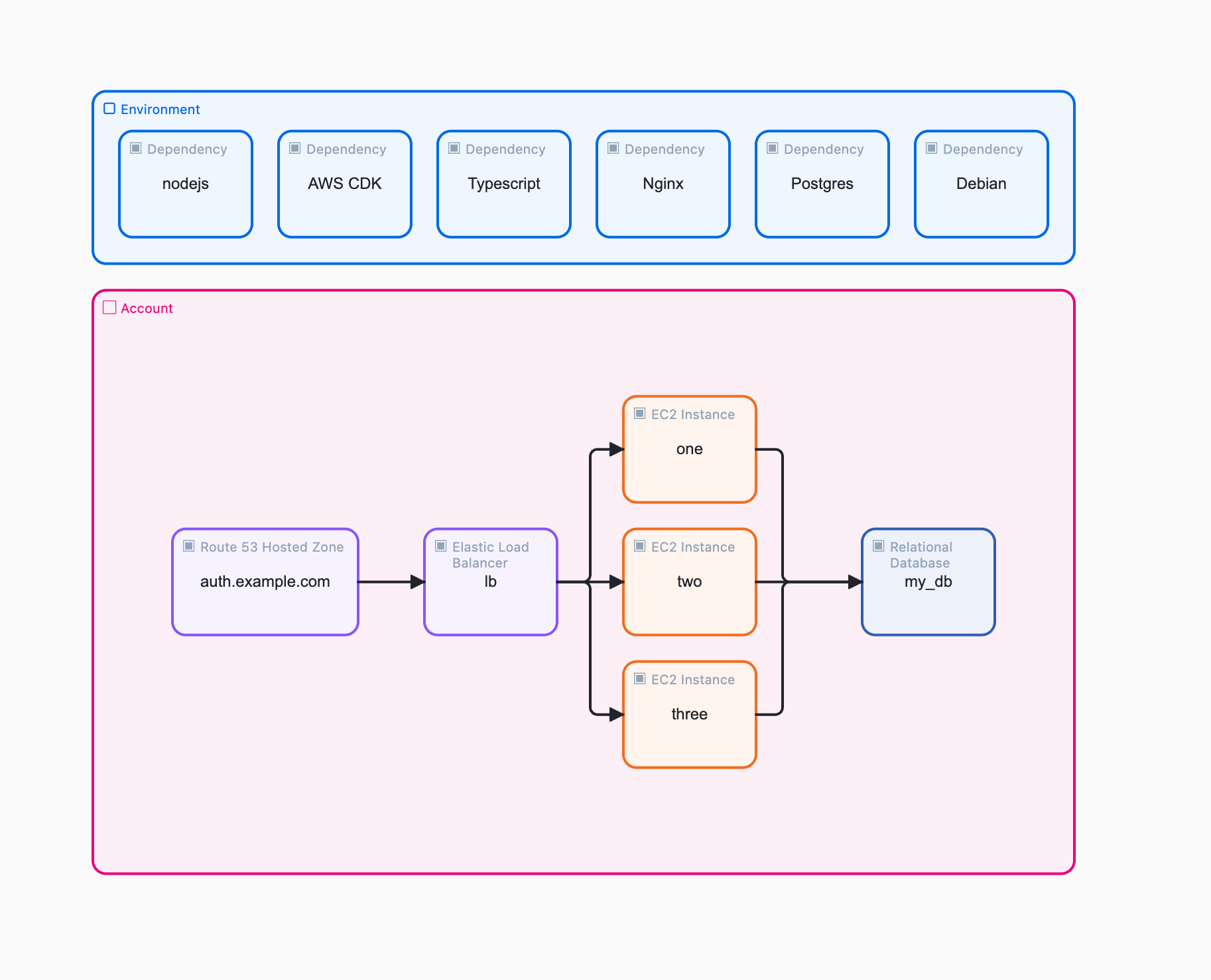
…and generate complete, working infrastructure?
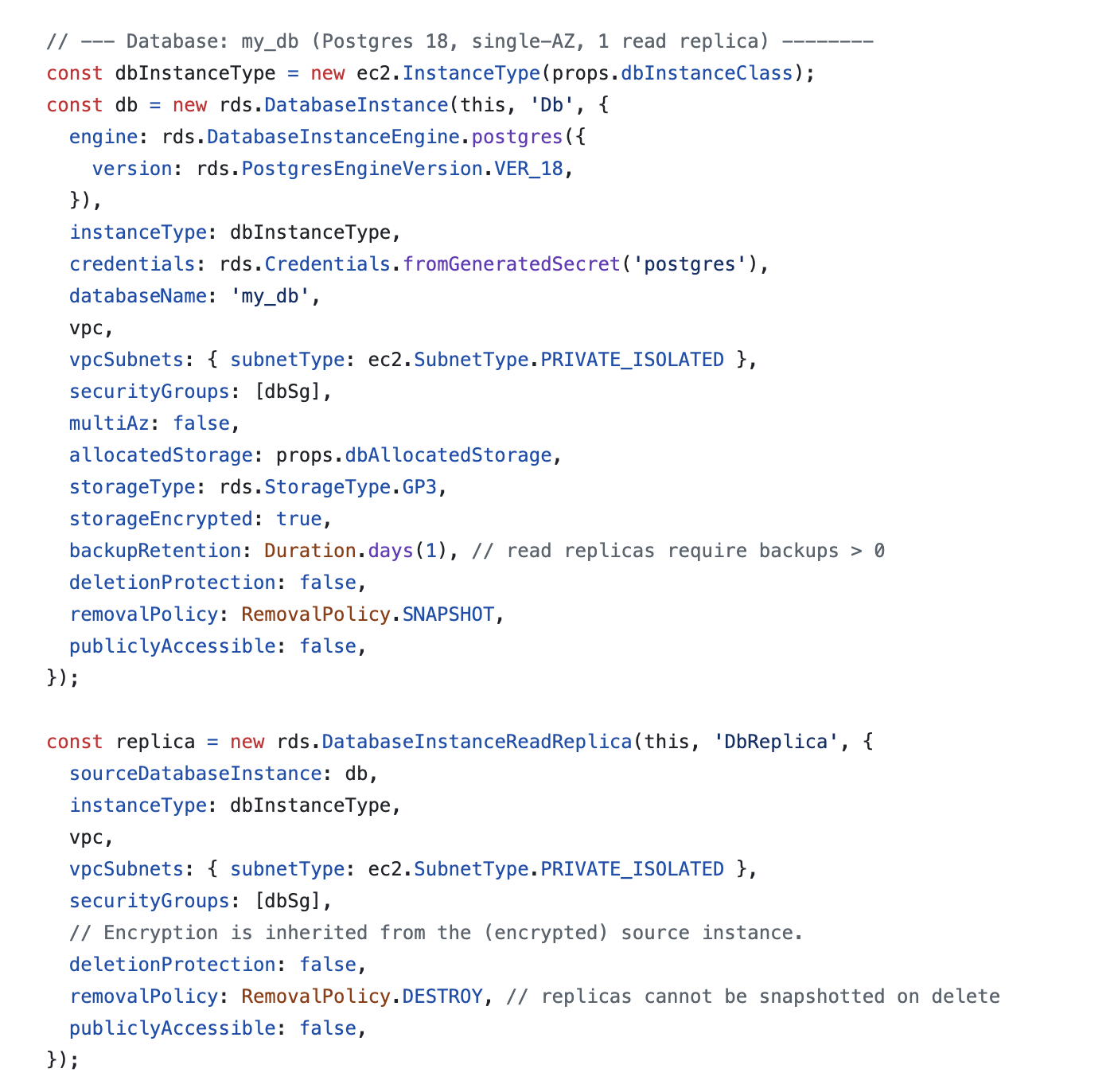
Here’s the prompt:
Build https://dai.studio/blog/cloud-types/raw
Introducing DAI Studio Cloud Types, a new way to define cloud infrastructure with diagrams and AI agents. Draw your cloud architecture, paste the diagram into any agent, and get CloudFormation, AWS CDK, Terraform, Bicep, or Pulumi returned.
Each Cloud Type carries metadata that helps agents get the details of your architecture right. Agent output is only as good as the input provided, so the more detail you add, the better your results.
Here is metadata for the Database Cloud Type in the example:
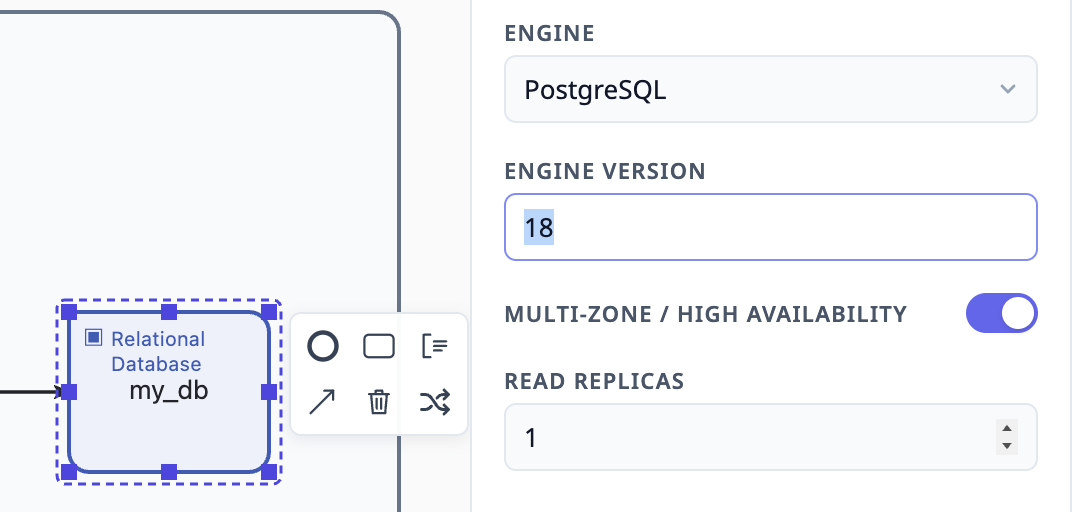
The properties denote a Postgres 18 named “mydb” with 1 read replica and the CDK output is a perfect match.
DAI Studio includes 213 Cloud Types across five categories: Generic, AWS, Azure, Google Cloud, and Cloudflare.
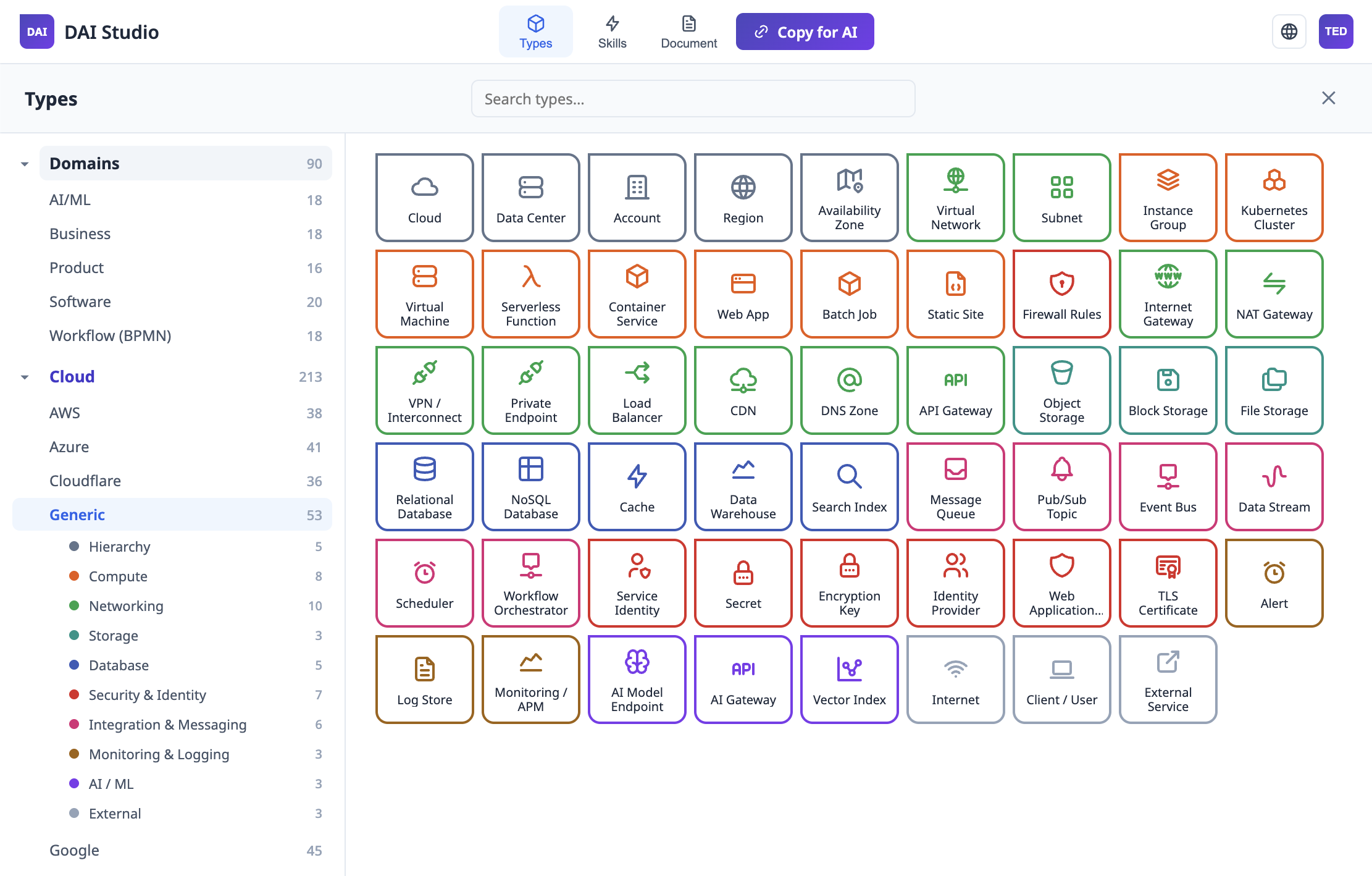
I am planning to post a series of diagrams and source examples using Cloud Types, so stay tuned. In the meantime, you can try DAI Studio and start drawing your cloud architecture today.
Enjoy,
Ted :)
Examples
-
Getting Started:
-
Architecture:
-
Document to Diagram:
-
Reporting:
Reference
- The .dai Format
- Namespaces
- Diagram Metadata (dai:workflowMeta)
- Universal Attributes
- Element Types
- Typed Properties (dai:properties)
- Flow & Structure Elements
- Annotations & Data
The .dai Format
A .dai file is BPMN 2.0 XML with a dai: namespace extension layered on top; an abstract tree where SubProcess nests freely. Shows the minimal skeleton.
A .dai file is a BPMN 2.0 XML document extended with a custom dai: namespace. It describes a process, system, or domain as an abstract tree of semantically typed nodes:
- Typed elements carry a
dai:type(plus, for the original types, a legacydai:stepType) and their values asdai:attributes or<dai:field>children. - Every typed element is either a
bpmn:taskor abpmn:subProcess, decided only by whether it has children: no children,bpmn:task; children,bpmn:subProcess. That applies to every type — an Agent, an Epic, a VPC — and its type and values are identical in both forms. bpmn:subProcesselements nest freely and at any depth to express containment, scope, and hierarchy. A container can contain other containers, which can contain steps, which can contain further containers. There is no depth limit.- Because the file is valid BPMN 2.0, any standard BPMN tooling can read the structure, while the
dai:attributes carry the semantic typing that LLMs and agents act on.
.dai files carry the .dai extension and live in your DAI Studio account at dai.studio: open one from your dashboard, bring files you already have in with Upload .dai, and take them back out with Download .dai. Author or edit a diagram, then hand it to a model: Copy for AI in the editor’s top bar copies a link to the live raw XML, and Document → Export → Copy XML puts the complete file on the clipboard — see Copying to LLMs.
Minimal skeleton
Every .dai file follows this shape — a bpmn:definitions root declaring the namespaces, one bpmn:process holding the workflow metadata and the element tree, plus a diagram-interchange section that stores the visual layout:
<?xml version="1.0" encoding="UTF-8"?>
<bpmn:definitions
  xmlns:bpmn="http://www.omg.org/spec/BPMN/20100524/MODEL"
  xmlns:bpmndi="http://www.omg.org/spec/BPMN/20100524/DI"
  xmlns:dc="http://www.omg.org/spec/DD/20100524/DC"
  xmlns:di="http://www.omg.org/spec/DD/20100524/DI"
  xmlns:dai="https://dai.studio/schema/dai/1.0"
  xmlns:xsi="http://www.w3.org/2001/XMLSchema-instance"
  id="Definitions_1"
  targetNamespace="https://dai.studio/workflow">

  <bpmn:process id="Process_1" name="Untitled" isExecutable="false">
    <bpmn:extensionElements>
      <dai:workflowMeta
        description=""
        defaultModel="gpt-4o"
        targetLanguage=""
        targetFramework=""
        version="1.0" />
    </bpmn:extensionElements>

    <!-- flow elements go here -->

  </bpmn:process>

  <bpmndi:BPMNDiagram id="BPMNDiagram_1">
    <bpmndi:BPMNPlane id="BPMNPlane_1" bpmnElement="Process_1">
      <!-- shape and edge layout go here -->
    </bpmndi:BPMNPlane>
  </bpmndi:BPMNDiagram>

</bpmn:definitions>
The two document zones
A .dai file has two distinct zones, and only the first one carries meaning for an AI reading the file:
- The semantic tree — the
bpmn:definitions/bpmn:processcontent: typed tasks and containers, events, gateways, and connections, together with thedai:workflow metadata. This is what the LLM reads and reasons over. - The diagram interchange (DI) — the
bpmndi:BPMNDiagramsection: onebpmndi:BPMNShapeper element (with adc:Boundsx/y/width/height rectangle) and onebpmndi:BPMNEdgeper connection. Expanded sub-processes carryisExpanded="true"on their shape. This zone records visual layout only — DAI Studio needs it to reopen the diagram exactly as drawn, and other tools may ignore it.
Extension attributes use the dai: prefix
DAI Studio serializes its extension attributes in the dai: namespace, directly on the BPMN elements they extend:
<bpmn:task id="Task_1" name="Price Rule" dai:type="dai.types.ai.rule" dai:stepType="rule" dai:rulePriority="critical" dai:notes="…" />
Values that are stored as fields rather than attributes go in <dai:fields> inside bpmn:extensionElements. id and name are standard BPMN attributes and never take a prefix. See Universal Attributes for the attributes shared across types, where values go, and the Element Types pages for the per-type vocabulary.
Where to go next
- Namespaces — the six required declarations
- Diagram Metadata — framing the whole diagram for the AI
- Element Types — the typed vocabulary
- Flow & Structure Elements — containers, events, gateways, connections
Namespaces
The six required namespace prefixes every .dai file declares: bpmn, bpmndi, dc, di, dai, xsi.
Every .dai file declares six namespaces on the root bpmn:definitions element:
| Prefix | URI | Purpose |
|---|---|---|
bpmn: | http://www.omg.org/spec/BPMN/20100524/MODEL | BPMN 2.0 model — process, task, subProcess, events, gateways, sequence flows |
bpmndi: | http://www.omg.org/spec/BPMN/20100524/DI | BPMN diagram interchange — shapes, edges, labels |
dc: | http://www.omg.org/spec/DD/20100524/DC | Diagram common — the dc:Bounds layout rectangles |
di: | http://www.omg.org/spec/DD/20100524/DI | Diagram interchange — label styling |
dai: | https://dai.studio/schema/dai/1.0 | DAI Studio extensions — semantic typing and metadata |
xsi: | http://www.w3.org/2001/XMLSchema-instance | XML schema instance |
<bpmn:definitions
  xmlns:bpmn="http://www.omg.org/spec/BPMN/20100524/MODEL"
  xmlns:bpmndi="http://www.omg.org/spec/BPMN/20100524/DI"
  xmlns:dc="http://www.omg.org/spec/DD/20100524/DC"
  xmlns:di="http://www.omg.org/spec/DD/20100524/DI"
  xmlns:dai="https://dai.studio/schema/dai/1.0"
  xmlns:xsi="http://www.w3.org/2001/XMLSchema-instance"
  id="Definitions_1"
  targetNamespace="https://dai.studio/workflow">
The dai: namespace
The dai: namespace carries everything DAI Studio adds on top of standard BPMN. It appears in two places:
Extension attributes — applied directly on BPMN elements using the dai: prefix. Every typed element carries dai:type; every DAI attribute is prefixed, and unprefixed attributes are not part of the format:
<bpmn:task id="Task_1" name="Cite sources" dai:type="dai.types.ai.rule" dai:stepType="rule"
  dai:scope="global" dai:rulePriority="critical" dai:enforcement="hard"
  dai:notes="Every factual claim must be supported by a cited source URL." />
Extension elements — child elements inside bpmn:extensionElements:
<bpmn:extensionElements>
  <dai:workflowMeta description="…" defaultModel="gpt-4o" version="1.0" />
</bpmn:extensionElements>
The dai: extension elements are:
dai:workflowMeta, with itsdai:taskTypeEntrychildren — diagram-level framingdai:fields/dai:field key="…"— type values stored as child elements rather than attributesdai:properties/dai:property— typed field and parameter lists
Schema
The dai: vocabulary is declared in a machine-readable XSD served at the namespace URI — https://dai.studio/schema/dai/1.0 — so XML validators and IDEs can locate it automatically. The XSD collects the extension attributes into named attribute groups per BPMN element type and declares every dai: extension element. The per-type vocabulary itself — which keys each type has and where each is stored — is published by the type catalog at https://dai.studio/api/catalog; the XSD only constrains the shared structure (for example, the dai.types.<category>.<leaf> pattern of dai:type).
Diagram Metadata (dai:workflowMeta)
description, defaultModel, targetLanguage, targetFramework and version attributes on the root process’s dai:workflowMeta element.
The dai:workflowMeta extension element sits inside bpmn:extensionElements on the root bpmn:process. It frames the entire diagram for the AI — read first, before any element, it orients the overall execution strategy.
<bpmn:process id="Process_1" name="Order Validation" isExecutable="false">
  <bpmn:extensionElements>
    <dai:workflowMeta
      description="Validates incoming orders, enriches them with product data, and routes them to fulfilment or rejection."
      defaultModel="gpt-4o"
      targetLanguage="TypeScript"
      targetFramework="React"
      version="1.0" />
  </bpmn:extensionElements>
  <!-- flow elements -->
</bpmn:process>
Attributes
| Attribute | Purpose |
|---|---|
description | Plain-language explanation of what this diagram achieves. The AI reads this to orient its overall execution strategy. |
defaultModel | The AI model to use by default (e.g. gpt-4o, openai/gpt-4.1, claude-opus-4.5). Individual steps may override it — see Prompt and Agent. |
targetLanguage | Target programming language, if applicable (e.g. TypeScript, Python). |
targetFramework | Target framework, if applicable (e.g. React, FastAPI). |
version | Version string for the diagram (e.g. 1.0). |
The process name (shown on canvas and in the browser title) is the standard BPMN name attribute on bpmn:process, not part of the extension.
Task Type Entries
dai:workflowMeta can carry a list of dai:taskTypeEntry children — a dictionary describing what each type means in this diagram:
<dai:workflowMeta description="Build a website for DAI Studio" defaultModel="gpt-4o" version="1.0">
  <dai:taskTypeEntry type="dai.types.software.dependency" stepType="dependency"
    description="An external library, package, service, API, or resource the project relies on." />
  <dai:taskTypeEntry type="dai.types.ai.rule" stepType="rule"
    description="A constraint, policy, or business rule the AI must respect and enforce." />
  <dai:taskTypeEntry type="dai.types.ai.context" stepType="context"
    description="Background knowledge, grounding data, or reference material that informs downstream steps." />
  <dai:taskTypeEntry type="dai.types.product.story" stepType="story"
    description="Here story represents blog content" />
</dai:workflowMeta>
Each entry has a type (the dai:type id), a stepType for types that have a legacy one, and a description. Entries written with only stepType by older files still match their type. Because the element types are a vocabulary rather than a fixed mapping, the type glosses in the published Element Types pages are deliberately general — a task type entry lets you say “in this diagram, story means a blog post” and the AI will honour it.
DAI Studio maintains the dictionary automatically as you edit:
- When a type first appears on canvas, an entry is created with that type’s description from the type catalog.
- When the last element of a type is deleted, its orphaned entry is removed.
- Entries for types the editor doesn’t know are kept as long as elements still use them.
- Descriptions you customise are preserved — the app only fills in and prunes, it never overwrites your text.
In the editor, the Library panel lists every type in use with its description, and editing a description there writes the entry. You can also edit the entries by hand (or have an AI generate them) — the descriptions are plain text read as diagram-level context.
Universal Attributes
type, stepType, notes and code — the attributes shared by typed elements — and where every other value is stored.
Every typed element in a .dai file is a standard BPMN element — a bpmn:task, or a bpmn:subProcess once it has children — extended with dai: data. A few attributes are shared across all types; everything else is type-specific and stored in one of the places described under Where values go.
name
The BPMN-native name attribute, shown on the canvas as the element’s label. Extension data carries the typing and structured content; name is what humans see first.
<bpmn:task id="Task_1" name="Fetch product details" dai:type="dai.types.ai.tool" dai:stepType="tool" …
dai:type
The element’s type: its id in the DAI Studio type catalog, written as a dot path dai.types.<category>.<leaf> — for example dai.types.business.objective, dai.types.ai.agent, or dai.types.aws.lambda-function. This is what tells the AI which vocabulary entry an element belongs to. Every typed element carries it; omit it for a generic task or an untyped group.
The catalog is served at https://dai.studio/api/catalog, and every type is listed in the Element Types reference.
dai:stepType
The legacy short name of the 42 original types (rule, tool, risk, story, …). DAI Studio writes it alongside dai:type for those types so older readers keep working; newer types — including every cloud and open-source type — have no dai:stepType. When both are present, dai:type is authoritative. Files that carry only dai:stepType are still valid: DAI Studio adds the matching dai:type when it opens them.
The legacy values, by category:
- AI/ML —
agent,context,rule,skill,tool,prompt,memory,guardrail,dataset,evaluation,markdown-note— AI/ML Types - Business —
risk,decision-record,kpi,objective,stakeholder,requirement,assumption,milestone,budget,policy— Business Types - Software —
dependency,model,test,issue,api-endpoint,service,component,database,event,environment,pipeline,repository— Software Types - Product —
persona,story,epic,feature,journey,experiment,roadmap,feedback,product-metric— Product Types
dai:notes
The primary content attribute: instructions, descriptions, constraints, or any text the AI should process for this node. What notes means varies by type — a Rule states its constraint, a Tool describes what it does, a Story holds its “As a… I want… so that…” narrative — and the editor labels it accordingly (Rule, Story, Description, Notes), but in every case it is the free-text payload the AI reads first.
<bpmn:task id="Task_1" name="Price Rule" dai:type="dai.types.ai.rule" dai:stepType="rule"
  dai:notes="All line item prices must be greater than zero." />
dai:notes is also available on the flow and structure elements — groups, start/end/intermediate events, gateways, data stores, and categories — where it documents what the element represents:
<bpmn:startEvent id="Start_1" name="Order received" dai:notes="The pipeline starts when an order is submitted." />
dai:code
Implementation code, stored verbatim as an XML attribute. Used by Tool, whose code is included verbatim when the workflow runs.
dai:version
A version string. It is used by Dependency for the package version, by Service and Interface for the API version, by Release, and by open-source types for the project version.
Where values go
Each field of a type has exactly one storage location, published per field in the catalog:
| Storage | XML |
|---|---|
| name | The standard BPMN name attribute |
| attribute | dai:<key>="…" on the element |
| field | <bpmn:extensionElements><dai:fields><dai:field key="<key>">…</dai:field></dai:fields></bpmn:extensionElements> |
| properties | <dai:properties><dai:property name="…" type="…" /></dai:properties> inside bpmn:extensionElements — see Typed Properties |
The type tables in this reference mark field-stored keys with †; all other keys are dai: attributes. A field’s value is the element’s text, so multi-line content needs no escaping beyond normal XML:
<bpmn:task id="Task_repo" name="checkout-service"
  dai:type="dai.types.software.repository" dai:stepType="repository"
  dai:notes="Owns the checkout API and payment integration.">
  <bpmn:extensionElements>
    <dai:fields>
      <dai:field key="url">https://github.com/acme/checkout-service</dai:field>
      <dai:field key="platform">github</dai:field>
      <dai:field key="branch">main</dai:field>
    </dai:fields>
  </bpmn:extensionElements>
</bpmn:task>
When you write a .dai file by hand or with a model and aren’t sure whether a key is an attribute or a field, use <dai:field>: DAI Studio also reads attribute-backed keys from dai:fields, and preserves anything it doesn’t recognise.
A note on prefixes
Every DAI attribute carries the dai: prefix — dai:type, dai:stepType, dai:notes, and so on — matching the XSD. Unprefixed attributes are not part of the format. (The attributes on dai:workflowMeta and dai:taskTypeEntry are the exception — see Diagram Metadata.) DAI Studio still reads unprefixed values found in older files and rewrites them in the current form the next time the document is saved.
Element Types
The full typed vocabulary: the free Domains types (AI/ML, Business, Product, Software, Workflow), plus the Cloud and Open Source catalogs.
Element types are the semantic vocabulary of a .dai file. Rather than a fixed notation, each type names a concept — a rule, a tool, a risk, a persona — so an AI reading the file understands the intent of every element, not just its shape.
How typing works
A typed element carries a dai:type — its id in the DAI Studio type catalog, written as a dot path dai.types.<category>.<leaf> — plus that type’s values. The 42 original types also carry a legacy dai:stepType, which DAI Studio keeps writing alongside dai:type; newer types have only dai:type.
<bpmn:task id="Task_1" name="web_search"
  dai:type="dai.types.ai.tool" dai:stepType="tool"
  dai:language="python" dai:returns="list[dict]"
  dai:notes="Search the web and return up to n results." />
Each value lives in one place, published per field by the catalog: a dai: attribute, a <dai:field> child, or the dai:properties list — see Where values go.
Any type can be a container. An element with no children is a bpmn:task; once you nest elements inside it, it is a bpmn:subProcess. Its type and values don’t change. Some types — Agent, MCP Server, Session, Initiative, Release, Roadmap, Environment, System, and most cloud hierarchy and network types — are placed as containers by default. A bpmn:subProcess with no dai:type is a plain untyped group — see Flow & Structure Elements.
Where types come from
Types are published in a signed catalog served at https://dai.studio/api/catalog. The editor ships a built-in copy of the free Domains types, so it works offline. In the editor, Types in the top bar opens the catalog as views → categories → groups:
| View | Categories | Access |
|---|---|---|
| Domains | Workflow (BPMN), AI/ML, Business, Product, Software | Free |
| Cloud | Generic, AWS, Azure, Google Cloud, Cloudflare | One-time unlock — see Cloud & Open Source Types |
| Open Source | 17 categories, from OS and Containers to AI & ML and Business Apps | One-time unlock — see Cloud & Open Source Types |
| Other | Anything not assigned to a view | Free |
When a file uses a type the editor doesn’t know, the element is drawn grey with a dashed outline, its values are shown read-only, and it is saved unchanged.
The Domains vocabulary
Choose whichever types are semantically meaningful for your domain — the vocabulary is a toolkit, not a prescription. Within each category the editor lists types A–Z.
AI/ML Types
Primitives that shape how an AI thinks and acts — the core building blocks of AI workflows.
| Name | dai:type | Legacy dai:stepType | Documents |
|---|---|---|---|
| Agent | dai.types.ai.agent | agent | An autonomous AI agent (container by default) |
| Context | dai.types.ai.context | context | Background knowledge, grounding data, or reference material that informs downstream steps |
| Dataset | dai.types.ai.dataset | dataset | A training, fine-tuning, or evaluation dataset |
| Evaluation | dai.types.ai.evaluation | evaluation | An evaluation suite or benchmark for AI behaviour |
| Guardrail | dai.types.ai.guardrail | guardrail | A runtime enforcement or detection mechanism |
| Human | dai.types.ai.human | — | A human-in-the-loop step: a person approves, reviews, provides input or handles an escalation before the flow continues |
| Knowledge | dai.types.ai.knowledge | — | A knowledge base that AI steps retrieve from (RAG): documents, sites, wikis or databases indexed for search |
| Markdown | dai.types.ai.markdown-note | markdown-note | A freeform note with markdown content rendered on canvas |
| MCP Server | dai.types.ai.mcp-server | — | A Model Context Protocol (MCP) server that exposes Tools, resources and prompts to AI clients (container by default) |
| Memory | dai.types.ai.memory | memory | A persistent or long-term memory store |
| Model | dai.types.ai.model | — | An AI/ML model that Agents and Prompts use: an LLM, embedding, vision, speech or classical ML model |
| Output | dai.types.ai.output | — | A result an Agent or workflow produces: a response, document, file, structured data or action payload |
| Prompt | dai.types.ai.prompt | prompt | A reusable prompt template with system instructions, a user message, and an expected output format |
| Router | dai.types.ai.router | — | Routes a request to one of several Agents, Models or Tools based on intent, rules, similarity, or cost and latency |
| Rule | dai.types.ai.rule | rule | A constraint, policy, or business rule the AI must respect and enforce throughout the workflow |
| Session | dai.types.ai.session | — | One conversation or run scope (container by default) |
| Skill | dai.types.ai.skill | skill | An autonomous capability the AI can invoke when it judges the context appropriate |
| Tool | dai.types.ai.tool | tool | A callable function with a concrete implementation |
Business Types
Strategy, governance, and analysis artefacts.
| Name | dai:type | Legacy dai:stepType | Documents |
|---|---|---|---|
| Assumption | dai.types.business.assumption | assumption | A documented assumption the project or model depends on |
| Budget | dai.types.business.budget | budget | A budget or cost allocation for a project, initiative, or resource |
| Competitor | dai.types.business.competitor | — | A competing company or product |
| Constraint | dai.types.business.constraint | — | A fixed limit the work must fit within: a deadline, budget cap, legal or regulatory limit, technical limit or resource limit |
| Customer | dai.types.business.customer | — | A customer segment or named account the business serves |
| Decision | dai.types.business.decision-record | decision-record | A business decision: documents the context, the choice made and its consequences for future reference |
| Dependency | dai.types.business.dependency | — | Something the work needs from another team, vendor, decision or approval before it can proceed |
| Initiative | dai.types.business.initiative | — | A funded body of work that pursues one or more Objectives (container by default) |
| Key Result | dai.types.business.key-result | — | A measurable outcome that shows progress on an Objective, with a baseline, a target and the current value |
| KPI | dai.types.business.kpi-metric | kpi | A Key Performance Indicator — defines a measurable target used to evaluate the success of a process or initiative |
| Milestone | dai.types.business.milestone | milestone | A significant checkpoint or delivery target on the project timeline |
| Objective | dai.types.business.objective | objective | A strategic goal or OKR — a time-bound target the team aims to achieve |
| Partner | dai.types.business.partner | — | An outside organisation the business works with: a technology, reseller, supplier, integration or strategic partner |
| Policy | dai.types.business.policy | policy | An organisational or regulatory policy that governs how work is done |
| Question | dai.types.business.question | — | An open question the team needs to answer |
| Requirement | dai.types.business.requirement | requirement | A business or functional requirement with priority, source, acceptance criteria, and status |
| Risk | dai.types.business.risk-item | risk | A potential threat or uncertainty that could negatively affect the project or outcome |
| Stakeholder | dai.types.business.stakeholder | stakeholder | A person, role, or organisation with interest or influence in the project outcome |
Product Types
User needs, product structure, and discovery artefacts.
| Name | dai:type | Legacy dai:stepType | Documents |
|---|---|---|---|
| Criteria | dai.types.product.criteria | — | The conditions work must meet to count as done: acceptance criteria, success criteria, a definition of done or exit criteria |
| Epic | dai.types.product.epic | epic | A large body of work grouping multiple features or stories under a common strategic theme |
| Experiment | dai.types.product.experiment | experiment | A product experiment or A/B test — a structured hypothesis with a success metric, audience, and captured result |
| Feature | dai.types.product.feature | feature | A discrete product capability that delivers value to users |
| Feedback | dai.types.product.feedback | feedback | User feedback or insight as a distinct input artifact |
| Hypothesis | dai.types.product.hypothesis | — | A testable belief about a change and its effect: we believe [change] for [who] will [result]; we will know when [signal] |
| Insight | dai.types.product.insight | — | A learning drawn from research, feedback or data, and what it means for the product |
| Journey | dai.types.product.journey | journey | A user journey map — the sequence of steps a persona takes to achieve a goal |
| Metric | dai.types.product.metric | product-metric | A product or feature-level metric |
| Outcome | dai.types.product.outcome | — | The change in user or customer behaviour the product aims for, and how you will measure it |
| Persona | dai.types.product.persona | persona | A research-based user archetype that represents a segment of your target audience |
| Problem | dai.types.product.problem | — | A user or customer problem worth solving: who has it, the evidence for it, how often and how badly it hurts, and how people cope today |
| Release | dai.types.product.release | — | A versioned delivery to users (container by default) |
| Roadmap | dai.types.product.roadmap | roadmap | A release or roadmap container that sequences Epics, Features, and Milestones over a planning horizon (container by default) |
| Story | dai.types.product.story | story | A user story that defines a desired outcome from a specific persona’s perspective |
| To-do | dai.types.product.todo | — | A small action item for the team |
Software Types
Technical architecture, implementation, and quality artefacts.
| Name | dai:type | Legacy dai:stepType | Documents |
|---|---|---|---|
| Client | dai.types.software.client | — | An application people use to reach the system: a web, mobile or desktop app, a CLI or an SDK |
| Component | dai.types.software.component | component | A UI or software component — its type, props/interface, and usage description |
| Config | dai.types.software.config | — | Configuration for a service or environment: settings, feature switches and secret references, and where they come from |
| Database | dai.types.software.database | database | A database or data store — its engine, host, schema name, and access patterns |
| Decision | dai.types.software.decision | — | A technical or architecture decision record (ADR): the context, the options considered, the decision and its consequences |
| Dependency | dai.types.software.dependency | dependency | An external library, package, service, API, or resource the project relies on |
| Endpoint | dai.types.software.api-endpoint | api-endpoint | Defines a REST or GraphQL API endpoint — its method, path, auth, and request/response schemas |
| Environment | dai.types.software.environment | environment | A deployment environment — dev, staging, production, or any named runtime target (container by default) |
| Event | dai.types.software.event | event | A domain event in an event-driven or microservice architecture — its producer, consumers, payload schema, and broker |
| Feature Flag | dai.types.software.feature-flag | — | A runtime toggle that turns behaviour on or off without a deploy, for releases, experiments, operations or permissions |
| Interface | dai.types.software.interface | — | A contract between parts of the system that is more than one HTTP endpoint: an OpenAPI, GraphQL, gRPC or AsyncAPI spec, a library or SDK interface, a CLI or a file format |
| Issue | dai.types.software.issue | issue | A bug, defect, or blocker that needs to be tracked and resolved |
| Job | dai.types.software.job | — | A background or scheduled worker that runs to completion: triggered by a schedule, a queue, an event or by hand |
| Model | dai.types.software.model | model | A data schema or structured type definition |
| Pipeline | dai.types.software.pipeline | pipeline | A CI/CD or release pipeline |
| Queue | dai.types.software.queue | — | A message queue, topic or stream that carries messages between services |
| Repository | dai.types.software.repository | repository | A source control repository |
| Service | dai.types.software.service | service | An external or internal service — its base URL, auth scheme, and version |
| System | dai.types.software.system | — | A software system: the Services, Clients, Databases, Queues and Jobs that are owned and released together (container by default) |
| Test | dai.types.software.test | test | A test case or verification condition — documents what is being tested, how to run it, and what constitutes a pass |
Workflow (BPMN)
The BPMN control-flow vocabulary underneath the typed elements — events, gateways, tasks, containers, and connections, plus annotations, data stores, and categories. Every one of them accepts a dai:notes description, and a generic Task with no dai:type remains available for steps that don’t fit a more specific type.
Cloud & Open Source
Hundreds of further types for cloud architecture (Generic, AWS, Azure, Google Cloud, Cloudflare) and self-hosted open-source stacks. They follow the same rules — dai:type, fields, containment — and have no dai:stepType.
AI/ML Types
Element types that shape how the AI thinks and acts: the core primitives for building AI workflows.
AI/ML types are the core primitives of an AI workflow — the context, rules, tools, models, and agents a model reasons with. In the editor they live under Types → Domains → AI/ML. The Agent has its own page covering multi-agent composition.
Every type below can be a bpmn:task or — once it has children — a bpmn:subProcess container; types marked container by default are placed as containers. All of them accept the universal attributes. In the tables, dai:-prefixed keys are attributes on the element; keys marked † are stored as <dai:field key="…"> children (see Where values go).
There are 18 types in this category: Agent, Context, Dataset, Evaluation, Guardrail, Human, Knowledge, Markdown, MCP Server, Memory, Model, Output, Prompt, Router, Rule, Session, Skill, Tool.
Agent
dai:type="dai.types.ai.agent" · dai:stepType="agent" · container by default
An autonomous AI agent. Contains Tools, Skills, Rules, and Prompts as child elements. Agents can be nested to compose multi-agent systems. The Agent page covers composition, multi-agent patterns, and full examples.
| Key | Label | Input | Values / notes |
|---|---|---|---|
dai:notes | Description | textarea | What does this agent do? |
dai:agentRole | Role | text | e.g. “Research analyst”, “Code reviewer” |
dai:defaultModel | Model | model-selector | |
dai:agentType | Agent Type | select | autonomous · supervised · reactive · collaborative |
dai:memoryType | Memory | select | none · in-context · persistent · external |
dai:maxIterations | Max Iterations | number | e.g. 10; min 1 |
dai:stopCondition | Stop Condition | textarea | When should this agent stop? |
dai:outputSchema | Output Schema | code | e.g. JSON schema for the agent output |
dai:properties (child element) | Inputs | key-value |
Context
dai:type="dai.types.ai.context" · dai:stepType="context"
Background knowledge, grounding data, or reference material that informs downstream steps. It does not produce output itself — it shapes how the AI reasons. What sets Context apart from Memory is scope: Context is scoped, often ephemeral grounding for this workflow.
| Key | Label | Input | Values / notes |
|---|---|---|---|
dai:source | Source | select | manual · file · url · database · api · previous-step |
dai:format | Format | select | text · json · markdown · csv · code · html |
dai:scope | Scope | select | global · local |
dai:content | Content | textarea | Paste or write the context content here. This is the actual grounding data the AI will use. |
dai:notes | Notes | textarea | Describe what this context provides and how downstream steps should use it. |
<bpmn:task id="Task_ctx" name="Order Schema" dai:type="dai.types.ai.context" dai:stepType="context" dai:scope="global"
  dai:source="manual" dai:content="An order contains: orderId (str), customerId (str), lines (list of OrderLine)."
  dai:notes="The data shapes the validation steps below will be checked against." />
Dataset
dai:type="dai.types.ai.dataset" · dai:stepType="dataset"
A training, fine-tuning, or evaluation dataset. Distinct from Context — a runtime grounding source — a Dataset is a corpus artifact used to shape or evaluate model behaviour offline.
| Key | Label | Input | Values / notes |
|---|---|---|---|
dai:source | Source | select | curated · generated · scraped · synthetic |
split † | Split | select | train · eval · test · all |
dai:format | Format | select | jsonl · csv · parquet · text |
size † | Size | text | e.g. 10k examples, 2GB |
dai:notes | Notes | textarea | Describe what this dataset contains and how it is used. |
<bpmn:task id="Task_data" name="Support QA pairs" dai:type="dai.types.ai.dataset" dai:stepType="dataset"
  dai:source="curated" dai:format="jsonl"
  dai:notes="Anonymised support conversations used to tune the summarisation skill.">
  <bpmn:extensionElements>
    <dai:fields>
      <dai:field key="split">train</dai:field>
      <dai:field key="size">8k examples</dai:field>
    </dai:fields>
  </bpmn:extensionElements>
</bpmn:task>
Evaluation
dai:type="dai.types.ai.evaluation" · dai:stepType="evaluation"
An evaluation suite or benchmark for AI behaviour. Distinct from a generic Test — an Evaluation defines metrics, benchmarks, or scoring criteria used to assess model outputs.
| Key | Label | Input | Values / notes |
|---|---|---|---|
metric † | Metric | text | e.g. BLEU, ROUGE, accuracy, F1 |
benchmark † | Benchmark | text | e.g. MMLU, HumanEval, HellaSwag |
threshold † | Pass Threshold | text | e.g. ≥ 0.85, top-5% |
dai:method | Method | select | automated · human · hybrid |
dai:notes | Notes | textarea | Describe what this evaluation measures and how results should be interpreted. |
<bpmn:task id="Task_eval" name="Groundedness suite" dai:type="dai.types.ai.evaluation" dai:stepType="evaluation" dai:method="automated"
  dai:notes="Scores every generated summary against the retrieved source set.">
  <bpmn:extensionElements>
    <dai:fields>
      <dai:field key="metric">F1</dai:field>
      <dai:field key="threshold">≥ 0.85</dai:field>
    </dai:fields>
  </bpmn:extensionElements>
</bpmn:task>
Guardrail
dai:type="dai.types.ai.guardrail" · dai:stepType="guardrail"
A runtime enforcement or detection mechanism. Distinct from Rule (a policy-level constraint) — a Guardrail is actively applied at inference time: content filters, output validators, safety classifiers.
| Key | Label | Input | Values / notes |
|---|---|---|---|
guardrailType † | Type | select | input · output · both |
action † | Action | select | block · warn · redact · flag |
dai:trigger | Trigger | textarea | What pattern, condition, or classifier activates this guardrail? |
dai:notes | Notes | textarea | Describe the enforcement logic and any exceptions. |
<bpmn:task id="Task_guard" name="PII filter" dai:type="dai.types.ai.guardrail" dai:stepType="guardrail"
  dai:trigger="Detector matches email addresses, phone numbers, or national ID patterns.">
  <bpmn:extensionElements>
    <dai:fields>
      <dai:field key="guardrailType">both</dai:field>
      <dai:field key="action">redact</dai:field>
    </dai:fields>
  </bpmn:extensionElements>
</bpmn:task>
Human
dai:type="dai.types.ai.human" · no dai:stepType
A human-in-the-loop step: a person approves, reviews, provides input or handles an escalation before the flow continues.
| Key | Label | Input | Values / notes |
|---|---|---|---|
dai:notes | Description | textarea | What is this human for? |
action † | Action | select | approve · review · input · escalation; default approve |
dai:assignee | Role / assignee | text | e.g. Support lead |
channel † | Channel | select | in-app · email · chat · ticket · other |
instructions † | Instructions | textarea | What the person should check or decide |
timeout † | Timeout | text | e.g. 24h |
onTimeout † | On timeout | select | proceed · reject · escalate |
Knowledge
dai:type="dai.types.ai.knowledge" · no dai:stepType
A knowledge base that AI steps retrieve from (RAG): documents, sites, wikis or databases indexed for search. Distinct from Context (inline grounding), Memory (accumulates over time) and Dataset (offline training or evaluation).
| Key | Label | Input | Values / notes |
|---|---|---|---|
dai:notes | Description | textarea | What is this knowledge for? |
sourceType † | Source | select | documents · website · wiki · database · code · api · other |
location † | Location | text | URL, bucket, path or connection |
retrieval † | Retrieval | select | vector · keyword · hybrid · graph; default hybrid |
embeddingModel † | Embedding model | text | e.g. text-embedding-3-large |
chunking † | Chunking | text | e.g. 800 tokens, 100 overlap |
refresh † | Refresh | select | static · scheduled · live |
topK † | Results per query (top-k) | number | min 1; default 5 |
Markdown
dai:type="dai.types.ai.markdown-note" · dai:stepType="markdown-note"
A freeform note with markdown content rendered on canvas. Use it for documentation, context, or instructions that travel with the diagram. Two additional editor-behaviour attributes control how the note participates in the diagram:
| Key | Label | Input | Values / notes |
|---|---|---|---|
dai:markdown | Content | markdown | # Heading Write your note here… |
dai:agent_ignore | Ignore in Agent Context | boolean | default true |
dai:zoom | Text Zoom | range | 50–200, step 10; default 100 |
<bpmn:task id="Task_note" name="Definition of done" dai:type="dai.types.ai.markdown-note" dai:stepType="markdown-note"
dai:markdown="# Done means - all tests green - docs updated" />
MCP Server
dai:type="dai.types.ai.mcp-server" · no dai:stepType · container by default
A Model Context Protocol (MCP) server that exposes Tools, resources and prompts to AI clients. Contains the Tools it exposes; connect Agents to it.
| Key | Label | Input | Values / notes |
|---|---|---|---|
dai:notes | Description | textarea | What is this mcp server for? |
transport † | Transport | select | stdio · http · sse; default stdio |
command † | Command | text | e.g. npx -y @modelcontextprotocol/server-github; For stdio transport |
url † | URL | text | https://…/mcp; For HTTP transports |
auth † | Auth | select | none · api-key · oauth |
dai:properties (child element) | Environment | key-value |
Memory
dai:type="dai.types.ai.memory" · dai:stepType="memory"
A persistent or long-term memory store. Distinct from Context — scoped, ephemeral grounding — Memory persists across sessions and accumulates over time.
| Key | Label | Input | Values / notes |
|---|---|---|---|
memoryType † | Type | select | episodic · semantic · procedural |
dai:scope | Scope | select | session · user · global |
backend † | Backend | text | e.g. vector DB, Redis, in-process |
dai:notes | Notes | textarea | Describe what this memory stores and how it is retrieved. |
<bpmn:task id="Task_mem" name="User preferences" dai:type="dai.types.ai.memory" dai:stepType="memory" dai:scope="user"
  dai:notes="Stores per-user tone and format preferences learned from past interactions.">
  <bpmn:extensionElements>
    <dai:fields>
      <dai:field key="memoryType">semantic</dai:field>
      <dai:field key="backend">vector DB</dai:field>
    </dai:fields>
  </bpmn:extensionElements>
</bpmn:task>
Model
dai:type="dai.types.ai.model" · no dai:stepType
An AI/ML model that Agents and Prompts use: an LLM, embedding, vision, speech or classical ML model. Records the provider, the model ID and default parameters. Distinct from Software → Model (a data schema).
| Key | Label | Input | Values / notes |
|---|---|---|---|
dai:notes | Description | textarea | What is this model for? |
model † | Model | model-selector | |
provider † | Provider | select | anthropic · openai · google · mistral · meta · deepseek · qwen · self-hosted · other |
modality † | Modality | select | text · multimodal · embedding · image · speech · classical; default text |
contextWindow † | Context window (tokens) | number | min 0 |
dai:temperature | Temperature | number | 0–2, step 0.1 |
maxOutputTokens † | Max output tokens | number | min 0 |
endpoint † | Endpoint | text | API base URL or deployment name |
Output
dai:type="dai.types.ai.output" · no dai:stepType
A result an Agent or workflow produces: a response, document, file, structured data or action payload. Defines its format, schema and destination.
| Key | Label | Input | Values / notes |
|---|---|---|---|
dai:notes | Description | textarea | What is this output for? |
dai:format | Format | select | text · markdown · json · file · image · audio · code; default text |
schema † | Schema | code | e.g. JSON Schema or example structure |
destination † | Destination | text | e.g. user, Slack channel, S3 path, API |
sampleOutput † | Example | textarea | A representative output |
Prompt
dai:type="dai.types.ai.prompt" · dai:stepType="prompt"
A reusable prompt template with system instructions, a user message, and an expected output format. Makes prompt engineering first-class: version, reuse, and compose prompts across workflows.
| Key | Label | Input | Values / notes |
|---|---|---|---|
dai:systemPrompt | System Message | textarea | Instructions that set the AI’s role and behaviour for this step. |
dai:userPrompt | User Message | textarea | The user-facing prompt. Use {{variable}} syntax for template variables. |
dai:outputFormat | Output Format | select | text · json · markdown · code · list · table |
defaultModel † | Model | model-selector | |
dai:temperature | Temperature | range | 0–1, step 0.1; 0 = deterministic, 1 = most creative |
dai:notes | Notes | textarea |
<bpmn:task id="Task_prompt" name="Summary prompt" dai:type="dai.types.ai.prompt" dai:stepType="prompt"
  dai:systemPrompt="You are a research analyst. Produce a structured summary with citations."
  dai:userPrompt="Research the following topic and summarise your findings: {{query}}"
  dai:outputFormat="markdown" />
Router
dai:type="dai.types.ai.router" · no dai:stepType
Routes a request to one of several Agents, Models or Tools based on intent, rules, similarity, or cost and latency. Connect it to each possible target.
| Key | Label | Input | Values / notes |
|---|---|---|---|
dai:notes | Description | textarea | What is this router for? |
strategy † | Strategy | select | llm · rules · semantic · cost · fallback; default llm |
model † | Classifier model | model-selector | |
dai:properties (child element) | Routes | key-value | |
defaultRoute † | Default route | text | Target when no route matches |
Rule
dai:type="dai.types.ai.rule" · dai:stepType="rule"
A constraint, policy, or business rule the AI must respect and enforce throughout the workflow. Scope, priority, and enforcement level determine how strictly it applies. Contrast with Guardrail, which is a runtime enforcement mechanism rather than a policy statement.
| Key | Label | Input | Values / notes |
|---|---|---|---|
dai:scope | Scope | select | global · local |
dai:rulePriority | Priority | select | critical · high · medium · low |
dai:enforcement | Enforcement | select | hard · soft · best-effort |
dai:notes | Rule | textarea | What constraint applies here? State it clearly and specifically. The AI will enforce this when generating outputs. |
<bpmn:task id="Task_rule" name="Price Rule" dai:type="dai.types.ai.rule" dai:stepType="rule"
  dai:scope="global" dai:rulePriority="critical" dai:enforcement="hard"
  dai:notes="All line item prices must be greater than zero. Orders with any zero-price line must be rejected." />
Session
dai:type="dai.types.ai.session" · no dai:stepType · container by default
One conversation or run scope. Contains the steps that share its state (messages, variables). Distinct from Memory, which persists across sessions.
| Key | Label | Input | Values / notes |
|---|---|---|---|
dai:notes | Description | textarea | What is this session for? |
dai:scope | Scope | select | user · conversation · task; default conversation |
stateStore † | State store | text | e.g. Redis, Postgres, in-memory |
ttl † | Expires after (TTL) | text | e.g. 30m |
maxTurns † | Max turns | number | min 1 |
Skill
dai:type="dai.types.ai.skill" · dai:stepType="skill"
An autonomous capability the AI can invoke when it judges the context appropriate. A Skill describes behaviour rather than implementation — as opposed to a Tool, which carries concrete code.
| Key | Label | Input | Values / notes |
|---|---|---|---|
dai:notes | Description | textarea | What can the AI do with this skill? Describe the capability and when it applies. |
dai:trigger | Trigger | text | When should the AI apply this skill? (e.g. “Whenever asked to summarise or condense content”) |
dai:examples | Examples | textarea | Input: “Explain quantum entanglement to a 10-year-old” Output: “Imagine you have two magic dice…” Input: … Output: … |
skillId † | Skill ID | text | owner/repo/skill (e.g. aave/skills/account-activity) |
dai:source | Source | text | https://github.com/owner/repo |
url † | Skill page | text | https://www.skills.sh/owner/repo/skill |
install † | Install | code | e.g. ["npx","skills","add","https://github.com/owner/repo","--skill","name","-y"]; argv list — append -a <agent> -g when installing; never join into a shell string. |
<bpmn:task id="Task_skill" name="Synthesise" dai:type="dai.types.ai.skill" dai:stepType="skill"
  dai:trigger="When at least 3 relevant sources have been read"
  dai:notes="Combine the retrieved content into a coherent, cited research summary organised by sub-topic." />
Tool
dai:type="dai.types.ai.tool" · dai:stepType="tool"
A callable function with a concrete implementation. The AI reads the description to understand what it does, then executes the code. Parameters are declared with dai:properties.
| Key | Label | Input | Values / notes |
|---|---|---|---|
dai:notes | Description | textarea | What does this tool do and what does it return? The AI will use this to decide when and how to invoke it. |
dai:language | Language | select | python · javascript · typescript · shell · sql · other |
dai:properties (child element) | Parameters | key-value | |
dai:returns | Returns | text | e.g. string, JSON object, number, void |
dai:code | Code | code | e.g. Paste or write the implementation code for this tool… |
The name doubles as the function name.
<bpmn:task id="Task_search" name="web_search" dai:type="dai.types.ai.tool" dai:stepType="tool"
  dai:language="python" dai:returns="list[dict]"
  dai:notes="Search the web and return up to n results as a list of {url, title, snippet} objects.">
  <bpmn:extensionElements>
    <dai:properties>
      <dai:property name="query" type="str" />
      <dai:property name="n"     type="int" />
    </dai:properties>
  </bpmn:extensionElements>
</bpmn:task>
See also
- Agent — how agents nest these primitives, and each other, into multi-agent systems
- Typed Properties —
dai:propertiesparameter lists on tools - Examples — complete workflows built from these types
Agent
The autonomous AI agent — its capabilities are the elements nested inside it, and it can nest other Agents for multi-agent pipelines.
dai.types.ai.agent (legacy dai:stepType="agent") is an autonomous AI agent whose capabilities are defined by the element tree nested inside it. Place Tool, Skill, Rule, Prompt, and Knowledge children inside an Agent to give it those capabilities. Agents nest inside other Agents to compose multi-agent systems.
Like every type, an Agent’s XML element depends only on whether it has children: an Agent holding tools and rules is a bpmn:subProcess; an Agent with nothing inside it is a bpmn:task. Its dai:type, attributes, and inputs are the same in both forms. DAI Studio places a new Agent as a container and switches the element automatically as you add or remove children.
Attributes
| Key | Label | Input | Values / notes |
|---|---|---|---|
dai:agentRole | Role | text | The agent’s purpose — e.g. “Research analyst”, “Code reviewer” |
dai:defaultModel | Model | model picker | The model this agent uses — overrides the diagram’s default |
dai:agentType | Agent Type | select | autonomous · supervised · reactive · collaborative |
dai:memoryType | Memory | select | none · in-context · persistent · external |
dai:maxIterations | Max Iterations | number | Maximum reasoning iterations before halting; min 1 |
dai:stopCondition | Stop Condition | textarea | Plain-language description of when the agent should stop |
dai:outputSchema | Output Schema | code | JSON schema describing the agent’s output structure |
dai:notes | Description | textarea | What this agent does |
dai:properties (child element) | Inputs | rows | Typed inputs — see Typed Properties |
All Agent values are attributes; none use dai:fields.
Example
<bpmn:subProcess id="Agent_1" name="Research Agent"
  dai:type="dai.types.ai.agent" dai:stepType="agent"
  dai:agentRole="Research analyst"
  dai:agentType="autonomous"
  dai:memoryType="in-context"
  dai:maxIterations="10"
  dai:stopCondition="Stop when a cited answer with ≥3 sources is produced."
  dai:notes="Searches the web, reads sources, and produces a cited research summary.">
  <bpmn:extensionElements>
    <dai:properties>
      <dai:property name="query"      type="str" />
      <dai:property name="maxSources" type="int" />
    </dai:properties>
  </bpmn:extensionElements>

  <bpmn:task id="Task_rule" name="Cite sources"
    dai:type="dai.types.ai.rule" dai:stepType="rule"
    dai:scope="global" dai:rulePriority="critical" dai:enforcement="hard"
    dai:notes="Every factual claim must be supported by a cited source URL." />
  <bpmn:task id="Task_search" name="web_search"
    dai:type="dai.types.ai.tool" dai:stepType="tool"
    dai:language="python" dai:returns="list[dict]"
    dai:notes="Search the web and return a list of {url, title, snippet} results.">
    <bpmn:extensionElements>
      <dai:properties>
        <dai:property name="query" type="str" />
        <dai:property name="n"     type="int" />
      </dai:properties>
    </bpmn:extensionElements>
  </bpmn:task>
  <bpmn:task id="Task_skill" name="Synthesise"
    dai:type="dai.types.ai.skill" dai:stepType="skill"
    dai:trigger="When enough sources have been gathered"
    dai:notes="Combine retrieved content into a coherent, cited summary." />
  <bpmn:task id="Task_prompt" name="Summary prompt"
    dai:type="dai.types.ai.prompt" dai:stepType="prompt"
    dai:systemPrompt="You are a research analyst. Produce a structured summary with citations."
    dai:userPrompt="Research the following topic and summarise your findings: {{query}}"
    dai:outputFormat="markdown" />
</bpmn:subProcess>
In DAI Studio the Agent’s dai:properties inputs are edited in the Properties panel’s Inputs rows.
Composition — nest Agents inside Agents
Nest one Agent inside another to build multi-agent pipelines. The outer agent orchestrates; inner agents become its sub-agents, and a bpmn:sequenceFlow between them establishes the order in which they run. Inner agents with nothing inside them are plain bpmn:task elements:
<bpmn:subProcess id="Agent_outer" name="Pipeline Agent"
  dai:type="dai.types.ai.agent" dai:stepType="agent"
  dai:agentType="collaborative"
  dai:notes="Orchestrates sub-agents to research and then write a report.">

  <bpmn:task id="Agent_researcher" name="Researcher"
    dai:type="dai.types.ai.agent" dai:stepType="agent"
    dai:agentRole="Research analyst" dai:agentType="autonomous"
    dai:notes="Gathers and summarises source material." />

  <bpmn:task id="Agent_writer" name="Writer"
    dai:type="dai.types.ai.agent" dai:stepType="agent"
    dai:agentRole="Technical writer" dai:agentType="supervised"
    dai:notes="Turns the research summary into a polished report." />

  <bpmn:sequenceFlow id="Flow_rw" sourceRef="Agent_researcher" targetRef="Agent_writer" />
</bpmn:subProcess>
Types that work with agents
Several AI/ML types exist to describe what sits around an agent:
| Type | Use it for |
|---|---|
| Model | The model an agent uses, with provider, context window, and default parameters — richer than dai:defaultModel alone |
| MCP Server | An MCP server whose Tools are nested inside it; connect Agents to it |
| Router | Picks which agent, model, or tool handles a request; connect it to each target |
| Session | A conversation or run scope that contains the steps sharing its state |
| Human | A human-in-the-loop approval, review, or escalation step |
| Output | What the agent produces, with its format, schema, and destination |
Other containers
Any type becomes a container once it has children. System, Environment, Initiative, Release, and Roadmap are placed as containers by default, like Agent. A bpmn:subProcess with no dai:type is a plain, untyped group — see Flow & Structure Elements.
See also
- AI/ML Types — the capabilities nestable inside an Agent
- Examples — the multi-agent research pipeline walks a complete Agent file
Business Types
Element types that document strategy, governance and analysis artefacts.
Business types make strategy, governance, and analysis artefacts first-class nodes in a diagram — instead of living in side documents, objectives, risks, and decisions travel with the workflow and the AI reads them as context. In the editor they live under Types → Domains → Business.
Every type below can be a bpmn:task or — once it has children — a bpmn:subProcess container; types marked container by default are placed as containers. All of them accept the universal attributes. In the tables, dai:-prefixed keys are attributes on the element; keys marked † are stored as <dai:field key="…"> children (see Where values go).
There are 18 types in this category: Assumption, Budget, Competitor, Constraint, Customer, Decision, Dependency, Initiative, Key Result, KPI, Milestone, Objective, Partner, Policy, Question, Requirement, Risk, Stakeholder.
Assumption
dai:type="dai.types.business.assumption" · dai:stepType="assumption"
A documented assumption the project or model depends on. Recording assumptions explicitly surfaces hidden risks and ensures the team agrees on what is being taken for granted.
| Key | Label | Input | Values / notes |
|---|---|---|---|
dai:status | Status | select | unvalidated · validated · invalidated |
dai:basis | Basis | textarea | What evidence, experience, or reasoning supports this assumption? |
dai:ifWrong | If Wrong | textarea | What is the impact if this assumption turns out to be incorrect? |
dai:owner | Owner | text | Who is responsible for validating this? |
dai:notes | Notes | textarea |
<bpmn:task id="Task_assume" name="Pricing API stays stable" dai:type="dai.types.business.assumption" dai:stepType="assumption"
  dai:status="unvalidated"
  dai:ifWrong="Enrichment steps must add a schema adapter; roughly three days of work." />
Budget
dai:type="dai.types.business.budget" · dai:stepType="budget"
A budget or cost allocation for a project, initiative, or resource. Makes financial constraints explicit alongside the other business constraints — an AI reading the diagram treats it like any other hard boundary.
| Key | Label | Input | Values / notes |
|---|---|---|---|
dai:amount | Amount | text | e.g. 50,000 |
dai:currency | Currency | select | USD · EUR · GBP · other |
dai:costType | Cost Type | select | capex · opex · headcount · tooling · other |
dai:owner | Owner | text | Who owns or approves this budget? |
dai:notes | Notes | textarea | Additional context, constraints, or approval requirements. |
<bpmn:task id="Task_budget" name="Integration testing" dai:type="dai.types.business.budget" dai:stepType="budget"
  dai:amount="15,000" dai:currency="USD" dai:costType="tooling"
  dai:notes="Covers third-party API spend for the beta period. Alert at 80%." />
Competitor
dai:type="dai.types.business.competitor" · no dai:stepType
A competing company or product. Documents its positioning, strengths, weaknesses and how much of a threat it is.
| Key | Label | Input | Values / notes |
|---|---|---|---|
website † | Website | text | https://… |
positioning † | Positioning | textarea | Who it targets and how it differentiates |
strengths † | Strengths | textarea | |
weaknesses † | Weaknesses | textarea | |
threat † | Threat | select | low · medium · high |
dai:notes | Notes | textarea |
Constraint
dai:type="dai.types.business.constraint" · no dai:stepType
A fixed limit the work must fit within: a deadline, budget cap, legal or regulatory limit, technical limit or resource limit. Distinct from Requirement (what to build), Policy (an org-wide rule) and Assumption (what is believed true).
| Key | Label | Input | Values / notes |
|---|---|---|---|
constraintType † | Type | select | time · budget · legal · technical · resource · other |
limit † | Limit | text | e.g. Launch by 1 March; max $50k; EU data residency |
dai:source | Source | text | Who or what imposes it |
negotiable † | Negotiable | boolean | default false |
dai:owner | Owner | text | Responsible person or team |
dai:notes | Notes | textarea |
Customer
dai:type="dai.types.business.customer" · no dai:stepType
A customer segment or named account the business serves. Distinct from Persona (a research archetype) and Stakeholder (someone with influence on the project).
| Key | Label | Input | Values / notes |
|---|---|---|---|
customerType † | Type | select | segment · account · individual; default segment |
industry † | Industry | text | |
size † | Size | select | consumer · smb · mid-market · enterprise |
needs † | Needs | textarea | Jobs to be done, problems, buying criteria |
value † | Value | text | e.g. ARR, LTV, revenue share |
dai:owner | Account owner | text | Responsible person or team |
dai:notes | Notes | textarea |
Decision
dai:type="dai.types.business.decision-record" · dai:stepType="decision-record"
A business decision — documents the context, the choice made, and its consequences for future reference. For technical or architecture decisions (ADRs), use Software → Decision.
| Key | Label | Input | Values / notes |
|---|---|---|---|
dai:status | Status | select | proposed · accepted · deprecated · superseded |
dai:context | Context | textarea | What is the issue, situation, or problem that motivated this decision? |
dai:decision | Decision | textarea | What was decided? State the choice clearly. |
dai:consequences | Consequences | textarea | What are the resulting trade-offs, positive or negative? |
dai:notes | Notes | textarea |
<bpmn:task id="Task_decision" name="Launch in the EU before the US" dai:type="dai.types.business.decision-record" dai:stepType="decision-record"
  dai:status="accepted"
  dai:context="Two design partners are EU-based and data-residency requirements are already met."
  dai:decision="Run the paid launch in the EU in Q1; follow with the US in Q2."
  dai:consequences="Earlier revenue from committed customers; US marketing spend moves a quarter later." />
Dependency
dai:type="dai.types.business.dependency" · no dai:stepType
Something the work needs from another team, vendor, decision or approval before it can proceed. Distinct from Software → Dependency (packages, services and APIs).
| Key | Label | Input | Values / notes |
|---|---|---|---|
dependencyKind † | Kind | select | team · vendor · decision · approval · data · other |
providedBy † | Provided by | text | Team, vendor or person |
needBy † | Needed by | text | e.g. 2026-11-15 |
dai:status | Status | select | not-started · in-progress · delivered · blocked; default not-started |
dai:owner | Owner | text | Responsible person or team |
dai:notes | Notes | textarea |
Initiative
dai:type="dai.types.business.initiative" · no dai:stepType · container by default
A funded body of work that pursues one or more Objectives. Contains its Milestones, Budget, Requirements and Risks; connect it to the Objectives it serves.
| Key | Label | Input | Values / notes |
|---|---|---|---|
dai:status | Status | select | proposed · approved · in-progress · on-hold · done · cancelled; default proposed |
sponsor † | Sponsor | text | |
dai:timeframe | Timeframe | text | e.g. Q3–Q4 2026 |
startDate † | Start | text | e.g. 2026-07-01 |
dai:targetDate | Target date | text | e.g. 2026-12-31 |
dai:owner | Owner | text | Responsible person or team |
dai:notes | Notes | textarea |
Key Result
dai:type="dai.types.business.key-result" · no dai:stepType
A measurable outcome that shows progress on an Objective, with a baseline, a target and the current value. Connect it to its Objective.
| Key | Label | Input | Values / notes |
|---|---|---|---|
metric † | Metric | text | e.g. Net Promoter Score |
baseline † | Baseline | text | |
dai:target | Target | text | |
current † | Current | text | |
dai:unit | Unit | text | e.g. %, users, $ |
dai:targetDate | Due | text | e.g. 2026-12-31 |
dai:status | Status | select | on-track · at-risk · off-track · achieved · missed; default on-track |
dai:owner | Owner | text | Responsible person or team |
dai:notes | Notes | textarea |
KPI
dai:type="dai.types.business.kpi-metric" · dai:stepType="kpi"
A Key Performance Indicator — a measurable target used to evaluate the success of a process or initiative.
| Key | Label | Input | Values / notes |
|---|---|---|---|
dai:target | Target Value | number | 100; min 0 |
dai:unit | Unit | text | e.g. %, $, count, ms |
dai:formula | Formula / Calculation | code | e.g. e.g. (completed / total) * 100 |
dai:frequency | Reporting Frequency | select | daily · weekly · monthly · quarterly · annually |
dai:owner | Owner | text | Responsible person or team |
dai:notes | Description | textarea | What does this KPI measure and why does it matter? |
<bpmn:task id="Task_kpi" name="Order validation rate" dai:type="dai.types.business.kpi-metric" dai:stepType="kpi"
  dai:target="99" dai:unit="%" dai:frequency="weekly"
  dai:formula="(valid_orders / total_orders) * 100" />
Milestone
dai:type="dai.types.business.milestone" · dai:stepType="milestone"
A significant checkpoint or delivery target on the project timeline. Documents the target date, the deliverables required, and whether it has been achieved.
| Key | Label | Input | Values / notes |
|---|---|---|---|
dai:targetDate | Target Date | text | e.g. 2025-Q3, 2025-09-30 |
dai:deliverables | Deliverables | textarea | What must be completed or delivered to achieve this milestone? |
dai:status | Status | select | planned · in-progress · achieved · missed |
dai:notes | Notes | textarea | Additional context, dependencies, or risks related to this milestone. |
<bpmn:task id="Task_mstone" name="Public beta" dai:type="dai.types.business.milestone" dai:stepType="milestone"
  dai:targetDate="2025-09-30" dai:status="in-progress"
  dai:deliverables="Order validation pipeline live in production with monitoring and on-call rota." />
Objective
dai:type="dai.types.business.objective" · dai:stepType="objective"
A strategic goal or OKR — a time-bound target the team aims to achieve. Pairs naturally with KPIs: the objective defines what success looks like, the KPI how it is measured.
| Key | Label | Input | Values / notes |
|---|---|---|---|
dai:status | Status | select | draft · active · achieved · missed |
dai:timeframe | Timeframe | select | q1 · q2 · q3 · q4 · annual · custom |
dai:keyResults | Key Results | textarea | 1. Increase NPS from 42 to 55 2. Reduce churn to below 3% 3. Launch in 2 new markets |
dai:owner | Owner | text | Responsible person or team |
dai:notes | Notes | textarea |
<bpmn:task id="Task_obj" name="Reduce fulfilment errors" dai:type="dai.types.business.objective" dai:stepType="objective"
dai:status="active" dai:timeframe="q3"
dai:keyResults="1. Cut mis-ships from 2% to 0.5% 2. Order validation suite passes continuously 3. Median fulfilment time under 24h" />
Partner
dai:type="dai.types.business.partner" · no dai:stepType
An outside organisation the business works with: a technology, reseller, supplier, integration or strategic partner.
| Key | Label | Input | Values / notes |
|---|---|---|---|
partnerType † | Type | select | technology · reseller · supplier · integration · strategic |
website † | Website | text | https://… |
agreement † | Agreement | text | e.g. MSA, revenue share, referral |
value † | Value | textarea | What each side gets |
dai:status | Status | select | prospect · active · ending · ended; default prospect |
dai:owner | Relationship owner | text | Responsible person or team |
dai:notes | Notes | textarea |
Policy
dai:type="dai.types.business.policy" · dai:stepType="policy"
An organisational or regulatory policy that governs how work is done. Distinct from a project-scoped Rule or Requirement — a Policy is org-level, typically externally mandated or board-approved, and applies across initiatives.
| Key | Label | Input | Values / notes |
|---|---|---|---|
dai:owner | Owner | text | e.g. Legal, Compliance, Board |
dai:authority | Authority | text | e.g. ISO 27001, GDPR, internal board resolution |
dai:scope | Scope | select | org · department · team · project |
dai:enforcementLevel | Enforcement | select | mandatory · advisory |
dai:notes | Notes | textarea | Describe the policy, its rationale, and any exceptions or exemptions. |
<bpmn:task id="Task_policy" name="EU data residency" dai:type="dai.types.business.policy" dai:stepType="policy"
  dai:owner="Compliance" dai:authority="GDPR"
  dai:scope="org" dai:enforcementLevel="mandatory"
  dai:notes="All personal data must be stored and processed in EU regions." />
Question
dai:type="dai.types.business.question" · no dai:stepType
An open question the team needs to answer. Unlike an Assumption it is not taken as true, and unlike a Decision it is not yet resolved.
| Key | Label | Input | Values / notes |
|---|---|---|---|
dai:status | Status | select | open · answered · deferred; default open |
dai:priority | Priority | select | high · medium · low |
dai:targetDate | Answer by | text | e.g. 2026-11-01 |
answer † | Answer | textarea | |
dai:owner | Owner | text | Responsible person or team |
dai:notes | Notes | textarea |
Requirement
dai:type="dai.types.business.requirement" · dai:stepType="requirement"
A business or functional requirement with priority, source, acceptance criteria, and status. Bridges business goals and technical delivery using the MoSCoW prioritisation framework.
| Key | Label | Input | Values / notes |
|---|---|---|---|
dai:priority | Priority | select | must · should · could · wont |
dai:status | Status | select | draft · agreed · implemented · verified · rejected |
dai:source | Source | text | Who or what originated this requirement? |
dai:acceptanceCriteria | Acceptance Criteria | textarea | What conditions must be true for this requirement to be considered met? |
dai:notes | Notes | textarea |
<bpmn:task id="Task_req" name="Column selection" dai:type="dai.types.business.requirement" dai:stepType="requirement"
  dai:priority="must" dai:status="agreed"
  dai:source="Alex the Analyst (persona interviews)"
  dai:notes="Users must be able to select which columns to include before exporting."
  dai:acceptanceCriteria="A column selector appears before download. Default is all columns checked." />
Risk
dai:type="dai.types.business.risk-item" · dai:stepType="risk"
A potential threat or uncertainty that could negatively affect the project or outcome. Tracks probability, impact, and mitigation.
| Key | Label | Input | Values / notes |
|---|---|---|---|
dai:probability | Probability | select | low · medium · high · critical |
dai:impact | Impact | select | low · medium · high · critical |
dai:mitigation | Mitigation Strategy | textarea | How will this risk be reduced or avoided? |
dai:owner | Owner | text | Responsible person or team |
dai:notes | Notes | textarea | Additional context or details. |
<bpmn:task id="Task_risk" name="Single-region deployment" dai:type="dai.types.business.risk-item" dai:stepType="risk"
  dai:probability="medium" dai:impact="critical"
  dai:mitigation="Replicate to a second region before the launch milestone." />
Stakeholder
dai:type="dai.types.business.stakeholder" · dai:stepType="stakeholder"
A person, role, or organisation with interest or influence in the project outcome. Documents their level of engagement and how to manage the relationship.
| Key | Label | Input | Values / notes |
|---|---|---|---|
dai:interest | Interest | select | low · medium · high |
dai:influence | Influence | select | low · medium · high |
dai:engagementStrategy | Engagement Strategy | textarea | How should this stakeholder be kept informed, involved, or managed? |
dai:notes | Notes | textarea |
<bpmn:task id="Task_stake" name="Warehouse operations lead" dai:type="dai.types.business.stakeholder" dai:stepType="stakeholder"
  dai:interest="high" dai:influence="high"
  dai:engagementStrategy="Weekly demo of the validation pipeline; co-own the cutover checklist." />
See also
- Examples — the business-strategy example combines objectives, risks, decisions, and stakeholders in one file
- The Rule type covers AI-behaviour constraints; Policy covers org-level mandates
Product Types
Element types that document user needs, product structure and discovery artefacts.
Product types document user needs, product structure, and discovery artefacts — personas, problems, stories, releases, experiments, and the feedback and insights that feed them. In the editor they live under Types → Domains → Product. Stories, journeys, and feedback name their persona in a persona field, or you can draw a connection from the Persona element on canvas.
Every type below can be a bpmn:task or — once it has children — a bpmn:subProcess container; types marked container by default are placed as containers. All of them accept the universal attributes. In the tables, dai:-prefixed keys are attributes on the element; keys marked † are stored as <dai:field key="…"> children (see Where values go).
There are 16 types in this category: Criteria, Epic, Experiment, Feature, Feedback, Hypothesis, Insight, Journey, Metric, Outcome, Persona, Problem, Release, Roadmap, Story, To-do.
Criteria
dai:type="dai.types.product.criteria" · no dai:stepType
The conditions work must meet to count as done: acceptance criteria, success criteria, a definition of done or exit criteria. Connect it to the Feature, Story or Release it applies to.
| Key | Label | Input | Values / notes |
|---|---|---|---|
criteriaType † | Type | select | acceptance · success · done · exit; default acceptance |
dai:format | Format | select | checklist · gherkin; default checklist |
dai:acceptanceCriteria | Conditions | textarea | - [ ] … or Given … When … Then … |
dai:owner | Owner | text | Responsible person or team |
dai:notes | Notes | textarea |
Epic
dai:type="dai.types.product.epic" · dai:stepType="epic"
A large body of work grouping multiple features or stories under a common strategic theme. Epics represent a significant product investment and typically span multiple sprints or quarters.
| Key | Label | Input | Values / notes |
|---|---|---|---|
dai:status | Status | select | draft · active · complete · cancelled |
dai:theme | Strategic Theme | text | The strategic initiative this epic advances |
dai:goal | Goal | textarea | What outcome does this epic achieve? Why does it matter to the business and users? |
dai:owner | Owner | text | Product owner or team |
dai:notes | Notes | textarea |
<bpmn:task id="Task_epic" name="Reporting exports" dai:type="dai.types.product.epic" dai:stepType="epic"
  dai:status="active" dai:theme="Analyst productivity"
  dai:goal="Let analysts move data out of the product without engineering help." />
Experiment
dai:type="dai.types.product.experiment" · dai:stepType="experiment"
A product experiment or A/B test — a structured hypothesis with a success metric, audience, and captured result. Essential for product teams running continuous discovery.
| Key | Label | Input | Values / notes |
|---|---|---|---|
dai:status | Status | select | draft · running · complete · abandoned |
dai:hypothesis | Hypothesis | textarea | We believe that [change] will result in [outcome] because [rationale]. |
dai:audience | Audience | text | Who is included in this experiment? (e.g. “New users, 50/50 split”) |
dai:successMetric | Success Metric | text | What measurement determines success? (e.g. “≥10% increase in activation rate”) |
dai:result | Result | textarea | What did you learn? Was the hypothesis validated or invalidated? |
dai:notes | Notes | textarea |
<bpmn:task id="Task_exp" name="Guided report starter" dai:type="dai.types.product.experiment" dai:stepType="experiment"
  dai:status="running"
  dai:hypothesis="We believe that a guided report starter will result in higher activation because new users currently churn before their first report."
  dai:audience="Trial signups, 50/50 split" dai:successMetric="≥10% increase in first-week report creation" />
Feature
dai:type="dai.types.product.feature" · dai:stepType="feature"
A discrete product capability that delivers value to users. The core unit of product delivery — sits above user stories and below epics in the agile hierarchy.
| Key | Label | Input | Values / notes |
|---|---|---|---|
dai:status | Status | select | idea · planned · in-progress · shipped · deprecated |
dai:valueStatement | Value Statement | textarea | This feature enables users to… |
dai:acceptanceCriteria | Acceptance Criteria | textarea | What conditions must be true for this feature to be considered complete? |
dai:owner | Owner | text | Product owner or team |
dai:notes | Notes | textarea |
<bpmn:task id="Task_feature" name="CSV export" dai:type="dai.types.product.feature" dai:stepType="feature"
  dai:status="in-progress"
  dai:valueStatement="This feature enables users to export any report as a CSV file in two clicks."
  dai:acceptanceCriteria="Every report surface has an Export button with format and column options." />
Feedback
dai:type="dai.types.product.feedback" · dai:stepType="feedback"
User feedback or insight as a distinct input artifact. Feeds into Personas, Stories, and Experiments — captures what users said, felt, or did as a first-class node in the product process.
| Key | Label | Input | Values / notes |
|---|---|---|---|
dai:source | Source | select | user-interview · survey · support-ticket · analytics · social · other |
sentiment † | Sentiment | select | positive · negative · neutral · mixed |
persona † | Persona | text | Which user or persona segment? |
dai:theme | Theme | text | e.g. onboarding friction, missing feature |
dai:notes | Notes | textarea | Summarise the feedback and any direct quotes. |
<bpmn:task id="Task_feedback" name="Export took too many clicks" dai:type="dai.types.product.feedback" dai:stepType="feedback"
  dai:source="support-ticket" dai:theme="export friction"
  dai:notes="Three tickets this week: 'I had to rebuild my column selection every export.'">
  <bpmn:extensionElements>
    <dai:fields>
      <dai:field key="sentiment">negative</dai:field>
    </dai:fields>
  </bpmn:extensionElements>
</bpmn:task>
Hypothesis
dai:type="dai.types.product.hypothesis" · no dai:stepType
A testable belief about a change and its effect: we believe [change] for [who] will [result]; we will know when [signal]. Unlike an Assumption it is not taken as true; an Experiment is how you test it.
| Key | Label | Input | Values / notes |
|---|---|---|---|
dai:hypothesis | Statement | textarea | We believe … for … will … We’ll know when … |
dai:successMetric | Signal | text | e.g. activation +10% |
confidence † | Confidence | select | low · medium · high |
dai:status | Status | select | untested · testing · validated · invalidated; default untested |
dai:owner | Owner | text | Responsible person or team |
dai:notes | Notes | textarea |
Insight
dai:type="dai.types.product.insight" · no dai:stepType
A learning drawn from research, feedback or data, and what it means for the product. Feedback is the raw input; an Insight is the conclusion.
| Key | Label | Input | Values / notes |
|---|---|---|---|
evidence † | Evidence | textarea | |
dai:source | Sources | text | e.g. 12 interviews, Q3 NPS survey |
implication † | Implication | textarea | What we should do differently |
confidence † | Confidence | select | low · medium · high |
dai:theme | Theme | text | |
dai:notes | Notes | textarea |
Journey
dai:type="dai.types.product.journey" · dai:stepType="journey"
A user journey map — the sequence of steps a persona takes to achieve a goal. Documents touchpoints, pain points, and opportunities to improve the experience.
| Key | Label | Input | Values / notes |
|---|---|---|---|
persona † | Persona | text | Which persona takes this journey?; Type the name of a Persona, or draw a connection from a Persona element on canvas to this Journey to link them. |
dai:goal | Goal | text | What is the persona trying to achieve? |
dai:steps | Steps | textarea | 1. Discovers the product via search 2. Visits landing page 3. Signs up for trial … |
dai:painPoints | Pain Points | textarea | Where does the experience break down or frustrate the user? |
dai:opportunities | Opportunities | textarea | Where can the experience be improved or delightful moments created? |
dai:notes | Notes | textarea |
<bpmn:task id="Task_journey" name="New user onboarding" dai:type="dai.types.product.journey" dai:stepType="journey" dai:goal="Reach first successful report within one session."
  dai:steps="1. Discovers the product via search 2. Visits landing page 3. Signs up for trial 4. Connects a data source 5. Builds first report">
  <bpmn:extensionElements>
    <dai:fields>
      <dai:field key="persona">Alex the Analyst</dai:field>
    </dai:fields>
  </bpmn:extensionElements>
</bpmn:task>
Metric
dai:type="dai.types.product.metric" · dai:stepType="product-metric"
A product- or feature-level metric. Distinct from the business KPI (organisation- or initiative-level) — product metrics track north-star signals, engagement, retention, and conversion at the feature or experiment level.
| Key | Label | Input | Values / notes |
|---|---|---|---|
metricType † | Type | select | north-star · engagement · retention · conversion · revenue · other |
currentValue † | Current Value | text | e.g. 42%, 1,200 DAU |
dai:target | Target | text | e.g. 60%, 2,000 DAU |
cadence † | Cadence | select | daily · weekly · monthly · quarterly |
dai:owner | Owner | text | Who is accountable for this metric? |
dai:notes | Notes | textarea | How is this metric measured and why does it matter? |
<bpmn:task id="Task_metric" name="Weekly active exporters" dai:type="dai.types.product.metric" dai:stepType="product-metric" dai:target="2,000">
  <bpmn:extensionElements>
    <dai:fields>
      <dai:field key="metricType">engagement</dai:field>
      <dai:field key="currentValue">1,200</dai:field>
      <dai:field key="cadence">weekly</dai:field>
    </dai:fields>
  </bpmn:extensionElements>
</bpmn:task>
Outcome
dai:type="dai.types.product.outcome" · no dai:stepType
The change in user or customer behaviour the product aims for, and how you will measure it. A Key Result is a number for an Objective; AI/ML → Output is something produced.
| Key | Label | Input | Values / notes |
|---|---|---|---|
dai:audience | Who | text | |
behaviourChange † | Behaviour change | textarea | What people will do differently |
dai:successMetric | Measured by | text | |
dai:target | Target | text | |
dai:status | Status | select | not-started · in-progress · achieved · missed; default not-started |
dai:owner | Owner | text | Responsible person or team |
dai:notes | Notes | textarea |
Persona
dai:type="dai.types.product.persona" · dai:stepType="persona"
A research-based user archetype representing a segment of the target audience. Grounds product decisions in real user needs and connects to Stories, Features, and Journeys.
| Key | Label | Input | Values / notes |
|---|---|---|---|
dai:role | Role | text | Job title or life role; Connect this Persona to Stories, Features, and Journeys on canvas by drawing connections from this element to link them to this user archetype. |
dai:age | Age Range | text | e.g. 28–35 |
dai:goals | Goals | textarea | What are they trying to achieve? |
dai:frustrations | Frustrations | textarea | What gets in their way? |
dai:behaviours | Behaviours | textarea | How do they currently solve the problem? |
dai:quote | Quote | text | A representative verbatim quote |
dai:notes | Notes | textarea |
<bpmn:task id="Task_persona" name="Alex the Analyst" dai:type="dai.types.product.persona" dai:stepType="persona"
  dai:role="Data Analyst" dai:age="28-40"
  dai:goals="Export report data to share with stakeholders who don't have system access."
  dai:frustrations="Manual copy-paste from tables is error-prone and slow."
  dai:quote="I just need to get this into Excel without reformatting everything." />
Problem
dai:type="dai.types.product.problem" · no dai:stepType
A user or customer problem worth solving: who has it, the evidence for it, how often and how badly it hurts, and how people cope today.
| Key | Label | Input | Values / notes |
|---|---|---|---|
dai:audience | Who has it | text | |
evidence † | Evidence | textarea | Interviews, tickets, data |
dai:frequency | Frequency | select | rare · occasional · frequent · constant |
dai:severity | Severity | select | low · medium · high · critical |
workaround † | Current workaround | textarea | |
dai:owner | Owner | text | Responsible person or team |
dai:notes | Notes | textarea |
Release
dai:type="dai.types.product.release" · no dai:stepType · container by default
A versioned delivery to users. Contains the Features and Stories that ship in it; Roadmap stays the longer planning view.
| Key | Label | Input | Values / notes |
|---|---|---|---|
dai:version | Version | text | e.g. 2.4.0 |
releaseDate † | Release date | text | e.g. 2026-12-01 |
dai:status | Status | select | planned · in-progress · released · rolled-back; default planned |
channel † | Channel | select | beta · ga · hotfix · internal |
releaseNotes † | Release notes | textarea | |
dai:owner | Owner | text | Responsible person or team |
dai:notes | Notes | textarea |
Roadmap
dai:type="dai.types.product.roadmap" · dai:stepType="roadmap" · container by default
A planning container that sequences Epics, Features, and Milestones over a planning horizon. It is placed as a container — a bpmn:subProcess once it holds children — so you can nest what ships when, in what order. For a single versioned delivery, use Release; Roadmap stays the longer planning view.
| Key | Label | Input | Values / notes |
|---|---|---|---|
horizon † | Horizon | text | e.g. H1 2026, Q3–Q4 2025 |
theme † | Theme | text | e.g. Growth, Platform stability |
status † | Status | select | draft · active · archived |
dai:notes | Notes | textarea | Describe the goals and constraints of this roadmap period. |
<bpmn:subProcess id="Roadmap_1" name="H1 2026" dai:type="dai.types.product.roadmap" dai:stepType="roadmap"
  dai:notes="Focus on exports and sharing; platform work only where it unblocks delivery.">
  <bpmn:extensionElements>
    <dai:fields>
      <dai:field key="horizon">H1 2026</dai:field>
      <dai:field key="theme">Analyst productivity</dai:field>
      <dai:field key="status">active</dai:field>
    </dai:fields>
  </bpmn:extensionElements>
  <bpmn:task id="Task_epic" name="Reporting exports" dai:type="dai.types.product.epic" dai:stepType="epic" … />
</bpmn:subProcess>
Story
dai:type="dai.types.product.story" · dai:stepType="story"
A user story defining a desired outcome from a specific persona’s perspective. Acceptance criteria make it testable; priority makes it actionable.
| Key | Label | Input | Values / notes |
|---|---|---|---|
persona † | Persona | text | Which persona does this story belong to?; Type the name of a Persona, or draw a connection from a Persona element on canvas to this Story to link them. |
dai:notes | Story | textarea | As a [persona], I want [goal] so that [reason]. |
dai:priority | Priority | select | must · should · could · wont |
dai:status | Status | select | backlog · ready · in-progress · done · rejected |
dai:acceptanceCriteria | Acceptance Criteria | textarea | What conditions must be true for this story to be considered done? |
dai:storyPoints | Story Points | number | Effort estimate; min 0 |
<bpmn:task id="Task_story" name="Export report as CSV" dai:type="dai.types.product.story" dai:stepType="story" dai:priority="must" dai:status="in-progress"
  dai:notes="As Alex, I want to export any report as a CSV file so that I can share the data with stakeholders in Excel."
  dai:acceptanceCriteria="All visible columns are included. Dates are ISO 8601. File downloads immediately on click.">
  <bpmn:extensionElements>
    <dai:fields>
      <dai:field key="persona">Alex the Analyst</dai:field>
    </dai:fields>
  </bpmn:extensionElements>
</bpmn:task>
To-do
dai:type="dai.types.product.todo" · no dai:stepType
A small action item for the team. Not user value like a Story, and not a defect like Software → Issue.
| Key | Label | Input | Values / notes |
|---|---|---|---|
dai:assignee | Assignee | text | |
dueDate † | Due | text | e.g. 2026-11-01 |
done † | Done | boolean | default false |
dai:priority | Priority | select | high · medium · low |
dai:notes | Notes | textarea |
See also
- Examples — the CSV-export feature models a persona, story, requirement, endpoint, tests, and an issue as one delivery slice
Software Types
Element types that document technical architecture, implementation and quality artefacts.
Software types document technical architecture, implementation, and quality artefacts — systems, services, interfaces, data, tests, defects, and delivery infrastructure. In the editor they live under Types → Domains → Software.
Every type below can be a bpmn:task or — once it has children — a bpmn:subProcess container; types marked container by default are placed as containers. All of them accept the universal attributes. In the tables, dai:-prefixed keys are attributes on the element; keys marked † are stored as <dai:field key="…"> children (see Where values go).
There are 20 types in this category: Client, Component, Config, Database, Decision, Dependency, Endpoint, Environment, Event, Feature Flag, Interface, Issue, Job, Model, Pipeline, Queue, Repository, Service, System, Test.
Client
dai:type="dai.types.software.client" · no dai:stepType
An application people use to reach the system: a web, mobile or desktop app, a CLI or an SDK. Different from Cloud → Client / User, which models the network actor.
| Key | Label | Input | Values / notes |
|---|---|---|---|
clientType † | Type | select | web · mobile · desktop · cli · sdk · other |
platform † | Platform | text | e.g. iOS, Android, browser, macOS |
framework † | Framework | text | e.g. React, SwiftUI, Flutter |
url † | URL / store link | text | |
auth † | Auth | select | none · session · oauth · api-key · other |
dai:owner | Owner | text | Responsible person or team |
dai:notes | Notes | textarea |
Component
dai:type="dai.types.software.component" · dai:stepType="component"
A UI or software component — its type, props/interface, and usage. Use it to document a component library, design system, or reusable building blocks.
| Key | Label | Input | Values / notes |
|---|---|---|---|
dai:componentType | Type | select | ui · layout · page · hook · utility · service · library |
dai:propsInterface | Props / Interface | code | e.g. interface Props { value: string; onChange: (v: string) => void; disabled?: boolean; } |
dai:notes | Description | textarea | What does this component do? Include usage examples and important behaviour. |
<bpmn:task id="Task_comp" name="DatePicker" dai:type="dai.types.software.component" dai:stepType="component"
dai:componentType="ui"
dai:propsInterface="interface Props { value: string; onChange: (v: string) => void; disabled?: boolean; }" />
Config
dai:type="dai.types.software.config" · no dai:stepType
Configuration for a service or environment: settings, feature switches and secret references, and where they come from.
| Key | Label | Input | Values / notes |
|---|---|---|---|
dai:format | Format | select | env · yaml · json · toml · properties · other |
dai:source | Source | select | file · config-service · vault · env · other |
dai:path | Path / key | text | e.g. config/production.yaml |
dai:properties (child element) | Settings | key-value | |
dai:notes | Notes | textarea |
Database
dai:type="dai.types.software.database" · dai:stepType="database"
A database or data store — engine, host, schema, and access patterns. Documents the data layer alongside Model and Endpoint elements.
| Key | Label | Input | Values / notes |
|---|---|---|---|
dai:engine | Engine | select | postgresql · mysql · sqlite · mongodb · redis · dynamodb · firestore · other |
dai:host | Host | text | e.g. db.example.com or localhost |
schema † | Schema | text | Database or schema name |
dai:accessPattern | Access Pattern | textarea | How is this database accessed? Read-heavy? Write-heavy? Used as a cache? Any connection pooling or replication notes? |
dai:notes | Notes | textarea |
<bpmn:task id="Task_db" name="Orders DB" dai:type="dai.types.software.database" dai:stepType="database"
  dai:engine="postgresql" dai:host="db.example.com"
  dai:accessPattern="Write-heavy during business hours; read replicas serve reporting queries.">
  <bpmn:extensionElements>
    <dai:fields>
      <dai:field key="schema">orders</dai:field>
    </dai:fields>
  </bpmn:extensionElements>
</bpmn:task>
Decision
dai:type="dai.types.software.decision" · no dai:stepType
A technical or architecture decision record (ADR): the context, the options considered, the decision and its consequences. For business decisions use Business → Decision.
| Key | Label | Input | Values / notes |
|---|---|---|---|
dai:status | Status | select | proposed · accepted · deprecated · superseded; default proposed |
dai:context | Context | textarea | |
options † | Options considered | textarea | |
dai:decision | Decision | textarea | |
dai:consequences | Consequences | textarea | |
deciders † | Deciders | text | |
decidedOn † | Date | text | e.g. 2026-10-12 |
dai:notes | Notes | textarea |
Dependency
dai:type="dai.types.software.dependency" · dai:stepType="dependency"
An external library, package, service, API, or resource the project relies on. Documents source, version, type, and license for dependency management and compliance.
| Key | Label | Input | Values / notes |
|---|---|---|---|
dai:package | Package | text | npm package, pip module, or repo URL |
dai:version | Version | text | e.g. ^18.2.0, >=3.10, 2.1.4 |
dai:dependencyType | Type | select | runtime · dev · peer · optional |
dai:license | License | text | e.g. MIT, Apache 2.0, GPL-3.0 |
dai:purpose | Purpose | textarea | Why is this dependency needed? What does it provide? |
dai:notes | Notes | textarea |
<bpmn:task id="Task_dep" name="stripe-node" dai:type="dai.types.software.dependency" dai:stepType="dependency"
  dai:package="stripe" dai:version="^16.8.0" dai:dependencyType="runtime"
  dai:license="MIT" dai:purpose="Server-side charging of saved payment methods." />
Endpoint
dai:type="dai.types.software.api-endpoint" · dai:stepType="api-endpoint"
Defines a REST or GraphQL API endpoint — its method, path, auth, and request/response schemas. The service field names the owning Service (or draw a connection from a Service element on canvas to link them).
| Key | Label | Input | Values / notes |
|---|---|---|---|
service † | Service | text | Which service owns this endpoint?; Type the name of a Service, or draw a connection from a Service element on canvas to this endpoint to link them. |
dai:method | HTTP Method | select | GET · POST · PUT · PATCH · DELETE · OPTIONS |
dai:path | Path | text | /api/v1/resource/{id} |
dai:statusCode | Status Code | text | e.g. 200, 201, 204 |
dai:authType | Auth | select | none · bearer · api-key · oauth2 · basic |
dai:requestBody | Request Schema | code | e.g. { "field": "type" } |
dai:responseBody | Response Schema | code | e.g. { "field": "type" } |
dai:notes | Description | textarea | What does this endpoint do? Include any important behaviour or limitations. |
<bpmn:task id="Task_api" name="POST /api/reports/:id/export" dai:type="dai.types.software.api-endpoint" dai:stepType="api-endpoint"
  dai:method="POST" dai:path="/api/reports/:id/export" dai:authType="bearer"
  dai:statusCode="200"
  dai:notes="Accepts a column selection and returns a CSV file stream.">
  <bpmn:extensionElements>
    <dai:fields>
      <dai:field key="service">Reporting Service</dai:field>
    </dai:fields>
  </bpmn:extensionElements>
</bpmn:task>
Environment
dai:type="dai.types.software.environment" · dai:stepType="environment" · container by default
A deployment environment — dev, staging, production, or any named runtime target. It is placed as a container — a bpmn:subProcess once it holds children — to group the services, databases, and components deployed in it. A System is what is built and released together; an Environment is where it runs.
| Key | Label | Input | Values / notes |
|---|---|---|---|
envType † | Type | select | development · staging · production · testing · other |
url † | URL | text | e.g. https://staging.example.com |
dai:notes | Notes | textarea | Describe this environment, its purpose, and any access requirements. |
<bpmn:subProcess id="Env_staging" name="Staging" dai:type="dai.types.software.environment" dai:stepType="environment"
  dai:notes="Deployed from the release pipeline on every tagged build.">
  <bpmn:extensionElements>
    <dai:fields>
      <dai:field key="envType">staging</dai:field>
      <dai:field key="url">https://staging.example.com</dai:field>
    </dai:fields>
  </bpmn:extensionElements>
  <bpmn:task id="Task_svc" name="Payment Service" dai:type="dai.types.software.service" dai:stepType="service" … />
</bpmn:subProcess>
Event
dai:type="dai.types.software.event" · dai:stepType="event"
A domain event in an event-driven or microservice architecture — producer, consumers, payload schema, and broker. Documents the async contracts between services.
| Key | Label | Input | Values / notes |
|---|---|---|---|
dai:producer | Producer | text | Which service or component emits this event? |
dai:consumers | Consumers | textarea | Which services or components listen for this event? |
dai:broker | Broker | select | kafka · rabbitmq · aws-sns · aws-sqs · gcp-pubsub · redis-pubsub · custom · none |
dai:payloadSchema | Payload Schema | code | e.g. { "orderId": "uuid", "userId": "uuid", "total": "number", "createdAt": "ISO8601" } |
dai:notes | Notes | textarea |
<bpmn:task id="Task_event" name="order.confirmed" dai:type="dai.types.software.event" dai:stepType="event"
dai:producer="Order Service" dai:consumers="Fulfilment Service, Notification Service"
dai:broker="kafka"
dai:payloadSchema="{"orderId": "uuid", "total": "number", "createdAt": "ISO8601"}" />
Feature Flag
dai:type="dai.types.software.feature-flag" · no dai:stepType
A runtime toggle that turns behaviour on or off without a deploy, for releases, experiments, operations or permissions. Records its key, default, rollout and when to remove it.
| Key | Label | Input | Values / notes |
|---|---|---|---|
flagKey † | Flag key | text | e.g. new-checkout |
flagType † | Type | select | release · experiment · ops · permission; default release |
defaultValue † | Default | text | e.g. off |
rollout † | Rollout % | number | 0–100 |
provider † | Provider | select | openfeature · launchdarkly · unleash · flagsmith · config · other |
dai:status | Status | select | active · rolled-out · removed; default active |
removeBy † | Remove by | text | e.g. 2027-01-31 |
dai:owner | Owner | text | Responsible person or team |
dai:notes | Notes | textarea |
Interface
dai:type="dai.types.software.interface" · no dai:stepType
A contract between parts of the system that is more than one HTTP endpoint: an OpenAPI, GraphQL, gRPC or AsyncAPI spec, a library or SDK interface, a CLI or a file format. Endpoint is a single operation; Model is a data shape.
| Key | Label | Input | Values / notes |
|---|---|---|---|
interfaceType † | Type | select | rest · graphql · grpc · async · library · cli · file · other |
dai:format | Spec format | select | openapi · graphql · protobuf · asyncapi · typescript · json-schema · other |
spec † | Spec | code | e.g. Paste or summarise the contract |
dai:version | Version | text | |
specUrl † | Spec link | text | https://… |
dai:owner | Owner | text | Responsible person or team |
dai:notes | Notes | textarea |
Issue
dai:type="dai.types.software.issue" · dai:stepType="issue"
A bug, defect, or blocker that needs to be tracked and resolved. Captures severity, type, reproduction steps, and expected vs actual behaviour.
| Key | Label | Input | Values / notes |
|---|---|---|---|
dai:issueType | Type | select | bug · enhancement · blocker · question |
dai:severity | Severity | select | critical · high · medium · low |
dai:status | Status | select | open · in-progress · resolved · closed · wont-fix |
dai:stepsToReproduce | Steps to Reproduce | textarea | 1. Go to… 2. Click on… 3. Observe… |
expectedResult † | Expected | textarea | What should happen? |
actualResult † | Actual | textarea | What actually happens? |
dai:assignee | Assignee | text | Who is fixing this? |
dai:notes | Notes | textarea |
<bpmn:task id="Task_issue" name="Date timezone offset bug" dai:type="dai.types.software.issue" dai:stepType="issue"
  dai:issueType="bug" dai:severity="medium" dai:status="open" dai:assignee="@maya"
  dai:stepsToReproduce="1. Export a report. 2. Open in Excel on a UTC+8 machine.">
  <bpmn:extensionElements>
    <dai:fields>
      <dai:field key="expectedResult">Dates match the values shown in the UI.</dai:field>
      <dai:field key="actualResult">Dates are offset by the user's local timezone.</dai:field>
    </dai:fields>
  </bpmn:extensionElements>
</bpmn:task>
Job
dai:type="dai.types.software.job" · no dai:stepType
A background or scheduled worker that runs to completion: triggered by a schedule, a queue, an event or by hand. Pipeline stays CI/CD.
| Key | Label | Input | Values / notes |
|---|---|---|---|
dai:trigger | Trigger | select | schedule · queue · event · manual; default schedule |
schedule † | Schedule | text | Cron, e.g. 0 3 * * * |
runtime † | Runtime | text | e.g. Node.js worker, Sidekiq, Celery |
timeout † | Timeout | text | e.g. 15m |
retries † | Retries | number | min 0; default 3 |
idempotent † | Idempotent | boolean | default false |
dai:owner | Owner | text | Responsible person or team |
dai:notes | Notes | textarea |
Model
dai:type="dai.types.software.model" · dai:stepType="model"
A data schema or structured type definition. Documents the shape of data flowing through the system and the notation used. Fields are declared with dai:properties.
| Key | Label | Input | Values / notes |
|---|---|---|---|
dai:modelFormat | Format | select | typescript · json-schema · sql · protobuf · avro · plain |
dai:notes | Description | textarea | What does this model represent? How is it used? |
dai:properties (child element) | Properties | key-value |
<bpmn:task id="Task_model" name="OrderLine" dai:type="dai.types.software.model" dai:stepType="model" dai:modelFormat="plain"
  dai:notes="A single line item within an order.">
  <bpmn:extensionElements>
    <dai:properties>
      <dai:property name="productId" type="str" />
      <dai:property name="quantity"  type="int" />
      <dai:property name="unitPrice" type="float" />
    </dai:properties>
  </bpmn:extensionElements>
</bpmn:task>
Pipeline
dai:type="dai.types.software.pipeline" · dai:stepType="pipeline"
A CI/CD or release pipeline. Documents the stages, trigger, toolchain, and target environment for a build, test, or deployment process.
| Key | Label | Input | Values / notes |
|---|---|---|---|
dai:trigger | Trigger | select | push · pr · schedule · manual |
tool † | Tool | text | e.g. GitHub Actions, Jenkins, CircleCI |
stages † | Stages | textarea | List the pipeline stages, e.g. lint → test → build → deploy |
targetEnvironment † | Target Environment | text | e.g. staging, production |
dai:notes | Notes | textarea | Additional context, dependencies, or failure handling. |
<bpmn:task id="Task_ci" name="Release pipeline" dai:type="dai.types.software.pipeline" dai:stepType="pipeline"
  dai:trigger="push">
  <bpmn:extensionElements>
    <dai:fields>
      <dai:field key="tool">GitHub Actions</dai:field>
      <dai:field key="stages">lint → test → build → deploy</dai:field>
      <dai:field key="targetEnvironment">staging</dai:field>
    </dai:fields>
  </bpmn:extensionElements>
</bpmn:task>
Queue
dai:type="dai.types.software.queue" · no dai:stepType
A message queue, topic or stream that carries messages between services. Event describes the message contract; Queue is the channel it travels on.
| Key | Label | Input | Values / notes |
|---|---|---|---|
dai:broker | Technology | select | rabbitmq · kafka · sqs · nats · redis · pubsub · other |
pattern † | Pattern | select | queue · topic · stream; default queue |
dai:producer | Producers | text | |
dai:consumers | Consumers | text | |
delivery † | Delivery guarantee | select | at-most-once · at-least-once · exactly-once |
deadLetter † | Dead-letter queue | text | |
dai:notes | Notes | textarea |
Repository
dai:type="dai.types.software.repository" · dai:stepType="repository"
A source control repository. Documents the URL, hosting platform, primary branch, and visibility to make the code location explicit alongside the components and services that depend on it.
| Key | Label | Input | Values / notes |
|---|---|---|---|
url † | URL | text | e.g. https://github.com/org/repo |
platform † | Platform | select | github · gitlab · bitbucket · azure · other |
branch † | Primary Branch | text | main |
visibility † | Visibility | select | public · private · internal |
dai:notes | Notes | textarea | Describe this repository, its contents, and any access requirements. |
<bpmn:task id="Task_repo" name="ex_auth" dai:type="dai.types.software.repository" dai:stepType="repository">
  <bpmn:extensionElements>
    <dai:fields>
      <dai:field key="url">https://github.com/dai-studio/ex_auth</dai:field>
      <dai:field key="platform">github</dai:field>
      <dai:field key="branch">main</dai:field>
      <dai:field key="visibility">public</dai:field>
    </dai:fields>
  </bpmn:extensionElements>
</bpmn:task>
Service
dai:type="dai.types.software.service" · dai:stepType="service"
An external or internal service — its base URL, auth scheme, and version. Provides the context for Endpoint elements that belong to it; connect endpoints to a Service element with sequence flows to link them.
| Key | Label | Input | Values / notes |
|---|---|---|---|
dai:baseUrl | Base URL | text | https://api.example.com |
dai:version | Version | text | e.g. v2, 2.1.0 |
dai:authType | Auth | select | none · bearer · api-key · oauth2 · basic |
dai:notes | Description | textarea | What does this service do? Include ownership, SLA, and any important constraints. |
<bpmn:task id="Task_svc" name="Payment Service" dai:type="dai.types.software.service" dai:stepType="service"
  dai:baseUrl="https://payments.internal.example.com" dai:version="2.1.0" dai:authType="oauth2" />
System
dai:type="dai.types.software.system" · no dai:stepType · container by default
A software system: the Services, Clients, Databases, Queues and Jobs that are owned and released together. Contains its parts; Environment is where they are deployed.
| Key | Label | Input | Values / notes |
|---|---|---|---|
boundary † | Boundary | select | internal · external; default internal |
dai:status | Status | select | planned · building · live · deprecated · retired; default live |
docsUrl † | Docs | text | https://… |
dai:owner | Owning team | text | Responsible person or team |
dai:notes | Notes | textarea |
Test
dai:type="dai.types.software.test" · dai:stepType="test"
A test case or verification condition — documents what is being tested, how to run it, and what constitutes a pass.
| Key | Label | Input | Values / notes |
|---|---|---|---|
dai:testType | Type | select | unit · integration · e2e · acceptance · performance · security |
dai:testStatus | Status | select | not-run · passing · failing · skipped |
dai:testSteps | Steps | textarea | How do you run this test? List the steps. |
expectedResult † | Expected Result | textarea | What should happen when the test passes? |
actualResult † | Actual Result | textarea | What actually happened? (fill in after running) |
dai:notes | Notes | textarea |
<bpmn:task id="Task_test" name="Basic export works" dai:type="dai.types.software.test" dai:stepType="test"
  dai:testType="e2e" dai:testStatus="not-run"
  dai:testSteps="1. Open any report. 2. Click Export. 3. Select all columns. 4. Click Download.">
  <bpmn:extensionElements>
    <dai:fields>
      <dai:field key="expectedResult">A CSV file downloads containing all report rows and selected columns.</dai:field>
    </dai:fields>
  </bpmn:extensionElements>
</bpmn:task>
For AI-specific eval suites, see Evaluation.
See also
- Examples — the CSV-export feature models a delivery slice with requirements, an endpoint, tests, and an issue
Cloud & Open Source Types
Hundreds of catalog types for cloud architecture and self-hosted open-source stacks, with containment expressing topology.
Beyond the free Domains types, the DAI Studio catalog publishes two larger collections, each a separate view in the editor’s Types overlay:
- Cloud: 200+ service types across five categories: Generic (provider-neutral), AWS, Azure, Google Cloud, and Cloudflare
- Open Source: 350+ open-source projects across 17 categories, from Debian to PostgreSQL to Kubernetes
Both are one-time, $10 add-ons per account. Until a view is unlocked, its tab shows a 🔒 and an Unlock button that opens checkout, and its types can’t be placed or picked in the type switcher. After you buy, you return to the same document with the view open. Documents that already contain cloud or open-source elements open, render, and edit normally without the add-on; only adding new ones is gated.
How they are written
Cloud and Open Source types follow the same rules as every other type:
dai:typeis a dot path such asdai.types.aws.lambda-function,dai.types.gcp.vpc-network,dai.types.cloudflare.worker,dai.types.cloud.object-storage, ordai.types.oss-database.postgresql. None of them has adai:stepType.- Most values are
dai:fields (e.g.cidrBlock,runtime,regionCode);dai:notesis an attribute;tagsis adai:propertieslist. - Any element becomes a
bpmn:subProcessonce it has children. Hierarchy and network types (accounts, regions, VPCs, subnets, clusters) are placed as containers by default.
Use containment to express topology: an account contains regions, a region contains networks, a network contains subnets, and a subnet contains the compute running in it.
<bpmn:subProcess id="Acct_prod" name="Production account" dai:type="dai.types.aws.account"
  dai:notes="Workload account for the production checkout stack.">
  <bpmn:extensionElements>
    <dai:fields>
      <dai:field key="accountPurpose">workload</dai:field>
      <dai:field key="environment">production</dai:field>
    </dai:fields>
  </bpmn:extensionElements>

  <bpmn:subProcess id="Region_use1" name="us-east-1" dai:type="dai.types.aws.region">
    <bpmn:extensionElements>
      <dai:fields><dai:field key="regionCode">us-east-1</dai:field></dai:fields>
    </bpmn:extensionElements>

    <bpmn:subProcess id="Vpc_main" name="checkout-vpc" dai:type="dai.types.aws.vpc">
      <bpmn:extensionElements>
        <dai:fields><dai:field key="cidrBlock">10.0.0.0/16</dai:field></dai:fields>
      </bpmn:extensionElements>

      <bpmn:task id="Fn_checkout" name="checkout-handler" dai:type="dai.types.aws.lambda-function"
        dai:trigger="API Gateway HTTP route"
        dai:notes="Validates the cart and creates the payment intent.">
        <bpmn:extensionElements>
          <dai:fields>
            <dai:field key="runtime">nodejs22.x</dai:field>
            <dai:field key="memoryMb">512</dai:field>
          </dai:fields>
        </bpmn:extensionElements>
      </bpmn:task>
    </bpmn:subProcess>
  </bpmn:subProcess>
</bpmn:subProcess>
Cloud
Every cloud category uses the same groups, and each group has the same colour across providers, so an AWS diagram and an Azure diagram read alike:
| Group | Contains |
|---|---|
| Hierarchy | Accounts, organisations, folders, projects, subscriptions, resource groups, regions, zones |
| Compute | VMs, instance groups, containers, Kubernetes, serverless functions, web apps |
| Networking | Networks, subnets, gateways, load balancers, API gateways, CDN, DNS, private endpoints |
| Storage | Object, block, and file storage |
| Database | Relational, NoSQL, caches, warehouses, search |
| Security | Identity, service accounts, secrets, keys, certificates, firewalls, WAF |
| Integration | Queues, topics, event buses, streams, schedulers, workflows |
| Monitoring | Metrics, logs, alerts, APM |
| AI | Model endpoints, AI gateways, vector indexes |
| External | Generic only: clients and users, the internet, external services |
Use Generic when the provider doesn’t matter or isn’t decided yet: it covers the same concepts (Virtual Machine, Object Storage, Message Queue, Load Balancer…) without vendor naming.
Open Source
| Category | Examples |
|---|---|
| OS | Debian, Alpine Linux, Fedora, Bottlerocket |
| Virtualization | KVM, Proxmox VE, OpenStack, Firecracker |
| Containers | Kubernetes, K3s, Docker Engine, containerd, Helm |
| Networking | Cilium, Calico, Istio, CoreDNS, Consul |
| Web & Proxy | Caddy, Envoy, HAProxy, Apache HTTP Server, Kong Gateway |
| Runtimes | Node.js, Bun, Deno, Go, OpenJDK, .NET |
| Frameworks | Django, FastAPI, Express, Angular, Astro |
| Database | PostgreSQL, CockroachDB, Apache Cassandra, Elasticsearch, etcd |
| Messaging | Apache Kafka, RabbitMQ, NATS, Redpanda |
| Data & Analytics | Apache Airflow, Apache Flink, Apache Iceberg, Airbyte |
| Storage | Ceph, MinIO, Longhorn, BorgBackup |
| Security & Identity | authentik, Authelia, cert-manager, CrowdSec |
| Observability | Grafana, Grafana Loki, Fluent Bit, Alertmanager |
| DevOps | Argo CD, Ansible, Crossplane, Apache JMeter |
| Integration & Platforms | Camunda 8, Apache Camel, Appwrite, Coolify |
| AI & ML | Chroma, Dify, DSPy, Haystack, gpt-oss |
| Business Apps | Drupal, Ghost, ERPNext, Jitsi Meet |
Open-source types record what you’d need to run the project: typically version (attribute) plus fields such as deployment mode, port, replicas, and endpoint.
See also
- Element Types — how typing, fields, and containers work
- Software Types — System, Service, Environment, and other technology-neutral types that pair well with cloud diagrams
Typed Properties (dai:properties)
dai:properties / dai:property child elements define typed fields, parameters, inputs, and key-value lists. Supported types: str, int, float, bool, date, datetime, list, dict.
Several element types carry lists of typed fields inside bpmn:extensionElements:
- Model — its schema fields
- Tool — its call parameters
- Agent — its typed inputs
- MCP Server — its environment variables
- Router — its routes
- Config — its settings
- Cloud and open-source types — their
tags
The container is dai:properties; each row is a dai:property with a name and a type:
<bpmn:task id="Task_model" name="OrderLine" dai:type="dai.types.software.model" dai:stepType="model" dai:modelFormat="plain"
  dai:notes="A single line item within an order.">
  <bpmn:extensionElements>
    <dai:properties>
      <dai:property name="productId" type="str" />
      <dai:property name="quantity"  type="int" />
      <dai:property name="unitPrice" type="float" />
      <dai:property name="confirmed" type="bool" />
    </dai:properties>
  </bpmn:extensionElements>
</bpmn:task>
Supported property types
| Type | Meaning |
|---|---|
str | String |
int | Integer |
float | Floating-point number |
bool | Boolean |
date | Calendar date |
datetime | Date and time |
list | Ordered collection |
dict | Key/value mapping |
Tool parameters
The Tool type declares its typed parameters the same way:
<bpmn:task id="Task_tool" name="fetchPrice" dai:type="dai.types.ai.tool" dai:stepType="tool" dai:language="python" dai:returns="float"
  dai:notes="Fetch the current price for a product SKU from the pricing service.">
  <bpmn:extensionElements>
    <dai:properties>
      <dai:property name="sku"      type="str" />
      <dai:property name="currency" type="str" />
    </dai:properties>
  </bpmn:extensionElements>
</bpmn:task>
Agent inputs
Agent uses the same container for its typed inputs, whether it is a bpmn:task or — with children — a bpmn:subProcess:
<bpmn:subProcess id="Agent_1" name="Research Agent" dai:type="dai.types.ai.agent" dai:stepType="agent" …>
  <bpmn:extensionElements>
    <dai:properties>
      <dai:property name="query"      type="str" />
      <dai:property name="maxSources" type="int" />
    </dai:properties>
  </bpmn:extensionElements>
  …
</bpmn:subProcess>
In DAI Studio these rows are edited directly in the Properties panel — labelled Properties on a Model, Parameters on a Tool, Inputs on an Agent — with a name field and a type dropdown per row; the panel writes the dai:properties element for you.
Flow & Structure Elements
The BPMN control-flow vocabulary layered under the typed elements: containers, events, gateways and connections.
Underneath the typed elements sits the standard BPMN control-flow vocabulary: containers, events, gateways, and the connections between them. In the editor these are the Workflow (BPMN) category of the Types overlay. Every one of them accepts a dai:notes description documenting what the element represents, and all of them nest freely inside containers at any depth.
Containers (SubProcess) — the nesting primitive
bpmn:subProcess is the primary structural tool. Use it freely at any depth to express containment, scope, domain boundaries, or logical clustering. Containers can contain other containers, any typed element, events, and gateways.
A container with no dai:type is a plain, untyped group:
<bpmn:subProcess id="Group_1" name="Group Name" dai:notes="What this group represents.">
  <!-- nested elements -->
</bpmn:subProcess>
A typed container is any typed element that has children — an Agent with its tools, an Epic with its stories, a VPC with its subnets. It carries exactly the same dai:type and values it would carry as a bpmn:task; whether an element is a task or a sub-process is decided only by whether it has children.
In DAI Studio you don’t place groups as such: drop elements onto a Task (or any typed element) and it becomes a container; remove its last child and it turns back into a task. Markdown notes are the one exception — they never take children. See Structuring with Nested Groups.
Task — the generic step
A plain bpmn:task with no dai:type is a generic step — a work item that doesn’t fit a more specific type:
<bpmn:task id="Task_validate" name="Validate order"
  dai:notes="Check that all required fields are present and that every line item satisfies the Price Rule." />
Any task can be switched to a typed element by setting its dai:type — in DAI Studio, with the type picker (T, or ⇋ in the Properties panel header or the element’s action menu). Changing type never changes whether an element is a task or a container.
Start Events
A workflow can begin in five ways:
| Type | XML | When to use |
|---|---|---|
| Start | <bpmn:startEvent id="…" name="…" dai:notes="…" /> | Starts immediately or by direct invocation. |
| Message Start | <bpmn:startEvent …><bpmn:messageEventDefinition messageRef="…" /></bpmn:startEvent> | Triggered by a specific incoming message from an external system. |
| Timer Start | <bpmn:startEvent …><bpmn:timerEventDefinition><bpmn:timeCycle>R/PT24H</bpmn:timeCycle></bpmn:timerEventDefinition></bpmn:startEvent> | Triggered on a schedule or after a delay — the timer definition is an ISO 8601 duration or datetime (e.g. R/PT24H, PT15M, 2026-01-01T00:00:00Z). DAI Studio’s Timer Definition field is stored as <dai:field key="timerDefinition">. |
| Conditional Start | <bpmn:startEvent …><bpmn:conditionalEventDefinition><bpmn:condition>queue.length > 0</bpmn:condition></bpmn:conditionalEventDefinition></bpmn:startEvent> | Triggered when a boolean expression becomes true (e.g. ${variable == true}). DAI Studio’s Condition field is stored as <dai:field key="condition">. |
| Signal Start | <bpmn:startEvent …><bpmn:signalEventDefinition signalRef="…" /></bpmn:startEvent> | Triggered by a named broadcast signal. |
End Event
Marks where a workflow path terminates:
<bpmn:endEvent id="End_1" name="Done" dai:notes="All lines confirmed." />
Intermediate Events
Between start and end, six intermediate event kinds are available:
| Type | XML pattern |
|---|---|
| Intermediate | <bpmn:intermediateThrowEvent id="…" name="…" dai:notes="…" /> |
| Message Catch | <bpmn:intermediateCatchEvent …><bpmn:messageEventDefinition messageRef="…" /></bpmn:intermediateCatchEvent> |
| Message Throw | <bpmn:intermediateThrowEvent …><bpmn:messageEventDefinition messageRef="…" /></bpmn:intermediateThrowEvent> |
| Timer | <bpmn:intermediateCatchEvent …><bpmn:timerEventDefinition>…</bpmn:timerEventDefinition></bpmn:intermediateCatchEvent> |
| Signal Catch | <bpmn:intermediateCatchEvent …><bpmn:signalEventDefinition signalRef="…" /></bpmn:intermediateCatchEvent> |
| Signal Throw | <bpmn:intermediateThrowEvent …><bpmn:signalEventDefinition signalRef="…" /></bpmn:intermediateThrowEvent> |
Gateways
Decision (exclusive gateway) — routes execution down exactly one outgoing path based on conditions:
<bpmn:exclusiveGateway id="Gateway_1" name="Valid?"
  dai:notes="Route to fulfilment if validation passes; otherwise reject." />
Parallel (fork/join) — splits execution into simultaneous branches (fork) or waits for all incoming branches (join). All outgoing paths are taken; no conditions are evaluated:
<bpmn:parallelGateway id="Gateway_2" name="Fetch in parallel" />
Use two parallel gateways to fork and then rejoin a set of parallel steps.
Connections
bpmn:sequenceFlow connects elements and controls execution order. An optional name labels the branch leaving a gateway — the label is what the AI reads as the branch condition:
<bpmn:sequenceFlow id="Flow_1" sourceRef="Start_1"    targetRef="Task_1" />
<bpmn:sequenceFlow id="Flow_2" sourceRef="Gateway_1"   targetRef="Task_2" name="yes" />
<bpmn:sequenceFlow id="Flow_3" sourceRef="Gateway_1"   targetRef="Task_3" name="no" />
See also
- Annotations & Data — side-channel elements that annotate the flow
- Element Types — the typed vocabulary carried by these structures
Annotations & Data
bpmn:textAnnotation + association for human-readable notes not processed during execution; bpmn:dataStoreReference to document where data is read from or written to; bpmn:group categories for visual grouping.
Three side-channel elements annotate the flow without being part of the typed element vocabulary: text annotations, data stores, and categories. They carry human-readable context (and can be useful to an AI too, when connected meaningfully) but they are not steps and do not affect execution order.
Text Annotation
A free-text note for human readers, attached to any element via a bpmn:association. Rendered as an open bracket with text next to the element; not processed during execution.
<bpmn:textAnnotation id="Annotation_1">
  <bpmn:text>Rejection must complete within the same transaction — no partial states.</bpmn:text>
</bpmn:textAnnotation>

<bpmn:association id="Association_1" sourceRef="Task_reject" targetRef="Annotation_1" />
The annotation’s content lives in the bpmn:text child element. In DAI Studio it is edited on the canvas or through the Properties panel’s Text field. In the editor this is the Annotation type.
Data Store
bpmn:dataStoreReference documents where data is read from or written to — a database, an object store, or any persistent store the process touches — without describing the connection mechanics (use the more specific Database type, or a cloud or open-source database type, when you want engine, host, and access pattern detail).
<bpmn:dataStoreReference id="DataStore_1" name="Orders DB"
  dai:notes="Long-term record of confirmed orders; retained for seven years." />
Category
A visual boundary for categorising related elements, drawn as a dashed frame on canvas. Categories colour-label regions of a large diagram — for example, “owned by team X” or “v2 scope” — without affecting execution or nesting semantics (unlike a container, elements visually inside a category are not its children in the tree). BPMN’s bpmn:group has no name attribute, so DAI Studio stores the category’s label as a field:
<bpmn:group id="Group_cat_1"
  dai:notes="Everything inside this boundary is planned for the v2 release.">
  <bpmn:extensionElements>
    <dai:fields>
      <dai:field key="name">v2 scope</dai:field>
    </dai:fields>
  </bpmn:extensionElements>
</bpmn:group>
Like other flow elements, Data Stores and Categories accept a dai:notes description.